Importing the fee schedule into the dental practice management software
How to import the fee schedule into the dental practice management software: file structure, columns, multiple price lists, errors to avoid, and tax checks.

Importing the price list into dental practice management software
Importing the fee schedule means uploading all the items the practice bills in one go from an Excel or CSV file: code, description, price, VAT regime, category, and, if needed, chair time duration. Done right, it takes a morning of preparation and just a few minutes to upload; rushed, it leads to incorrect estimates, credit notes to issue, and recalls linked to the wrong procedure. In this guide, you will find how to prepare the file, what columns are needed, how to handle multiple price lists (private, insurance networks, different locations), and how to check the result before using it with patients.
TreatbaseManage your price list with less bureaucracyTreatbase brings together invoicing and dental management in software designed to simplify the daily work of dental practices.Discover Treatbase
In brief
A dental practice's fee schedule is not a supplier catalog: each entry must carry its price, tax regime, clinical category, and often a link to a tooth or arch.
Before importing, it is best to clean up the price list: eliminate duplicates, unused items, and prices unchanged for years, and give each procedure a unique code.
A CSV or Excel file with fixed columns and one row per procedure is the safest format to upload into any management software.
Insurances, supplementary health funds, and multiple locations are best managed with separate price lists that share the same procedure code.
After uploading, test everything on a test patient: treatment plan, estimate, invoice, and submission of healthcare expense data.
Table of Contents
What a dental fee schedule contains
Before importing: cleaning up the price list
How to structure the file to import
Step-by-step procedure
Multiple price lists: private, insurance networks, funds, and locations
Common mistakes and how to avoid them
Tax aspects to verify
When the price list comes from legacy management software
Our point of view
Moving your price list to Treatbase
Frequently asked questions
Sources
What a dental fee schedule contains
When searching for “importing price lists”, you mostly find guides for contractors, warehouse management, and e-commerce: there, a price list is a catalog of items with an EAN code, purchase price, and markup. In a dental practice, a fee schedule is quite different. It is the list of clinical procedures that the dentist and hygienist perform and that the front desk includes in estimates and invoices.
Each item has a more complex life cycle than an inventory item. A “composite restoration” may have different prices for one, two, or three surfaces. A “zirconia crown” may appear on the private price list and on a healthcare fund's tariff sheet with a different fee. A “hygiene session” has a standard duration needed for scheduling and a frequency used for recall reminders. Because of this, before thinking about the file, it is worth clarifying what information the management software needs to receive for each procedure.
Typical information includes:
Internal code: a short, unique code that remains consistent over time even if the price or description changes.
Description: the text the patient reads on the estimate and invoice, clear and free of insider jargon or cryptic abbreviations.
Category: restorative, endodontics, periodontics, oral surgery, implantology, prosthodontics, orthodontics, hygiene and prevention, diagnostics.
Price: the base fee, with two decimal places and without currency symbols in the file.
Tax regime: exemption or applicable VAT rate, to be agreed upon with your accountant.
Unit of reference: per tooth, per arch, per quadrant, per session, or flat rate.
Chair time duration: estimated chair time in minutes, useful for realistic scheduling.
Status: active or deactivated, so historical entries remain on old records without appearing in new estimates.
Before importing: cleaning up the price list
The best time to organize your price list is precisely during the import process. Loading a list that has grown for years into a new system—with entries hastily added by different people—means carrying the same problems over into a faster environment. It only takes a few hours, ideally with the practice owner and the person who creates estimates sitting at the same table.
Export and count
Start with a complete export of your current price list, from the old management software or from the spreadsheet you use. Count the entries. In many practices, the list has hundreds of rows, but those actually used over a year are only a small fraction. If your current software allows you to extract billed procedures from the last twelve months, cross-reference them with the price list: anything that never appears is a candidate for deactivation.
Eliminate duplicates and unnecessary variants
Duplicates are the most common issue: “Scaling”, “Tartar removal”, and “Professional hygiene” all referring to the same appointment, or three separate entries for the same crown created at different times. Choose a single entry, with the description you want patients to see, and note which legacy codes merge into the new one. You will need this mapping table if you also migrate historical treatment plans.
Update prices once
If you are planning a price adjustment, it is best to do it in the file before importing, not afterward item by item inside the software. Keep one column with the old price and one with the new price: the comparison helps with decision-making and remains as an audit trail for accounting.
Decide on code logic
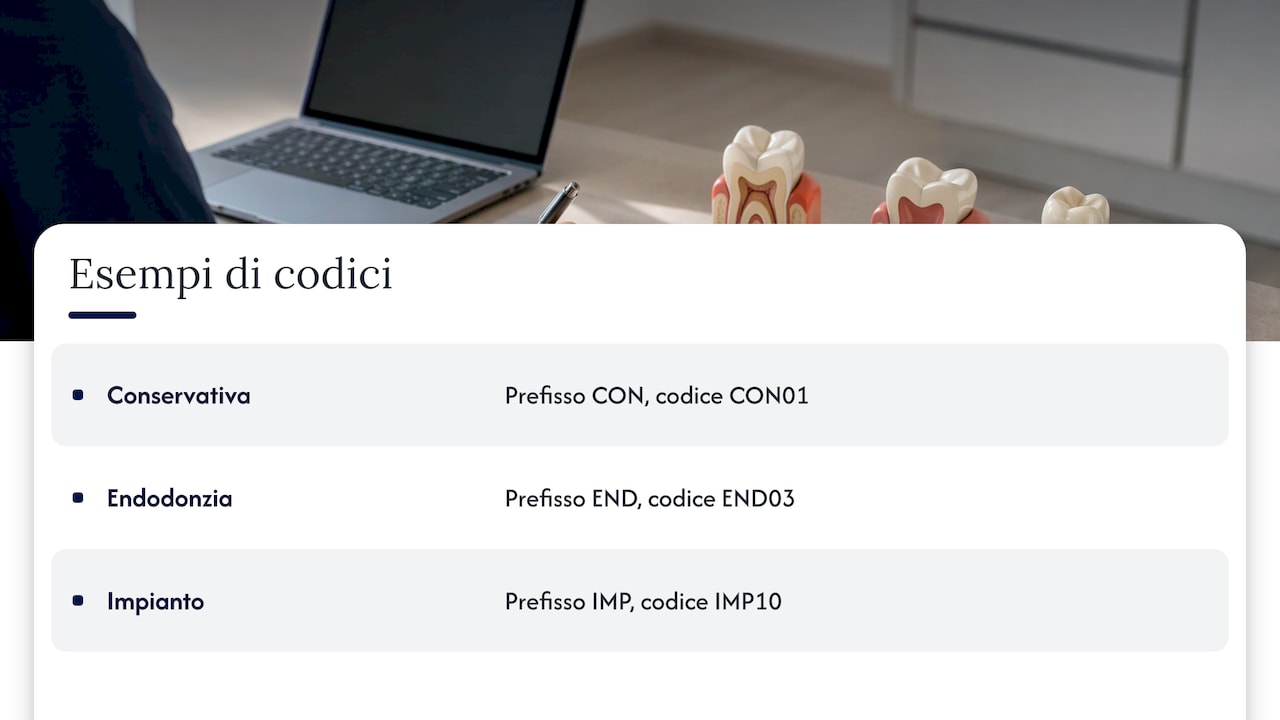
A well-designed code saves time every day. A simple solution is a prefix for the category followed by a sequential number: RES01 for the first restorative item, END03 for endodontics, IMP10 for an implant. The key is that the code must be unique, free of spaces or special characters, and never reassigned to a different procedure.
How to structure the file to import
Almost all management systems accept an Excel file (.xlsx) or a CSV. CSV is the most neutral format, but pay attention to delimiters: with Italian Excel settings, the field delimiter is often a semicolon and the decimal separator is a comma. If the receiving system expects a period as the decimal point, a price of 85,00 can become 8500 or an empty cell. Always check the import specifications before saving.
Here is a column structure that works as a solid foundation:
Column | Example | Notes |
|---|---|---|
code | RES02 | Unique, without spaces |
description | Composite filling, 2 surfaces | Patient-friendly text |
category | Restorative | One of the established categories |
price | 120.00 | Number only, consistent decimal format throughout |
vat_regime | Exempt | To be confirmed with the accountant |
unit | Tooth | Tooth, arch, quadrant, session, flat rate |
duration_min | 45 | Chair time in minutes |
price_list | Private | Name of the associated price list |
active | Yes | Yes / No |
The prices in the table are format examples, not fee recommendations. A few practical rules will prevent most upload rejections:
A single header row, with column names containing no accents or spaces.
No merged cells, no total rows, no notes or comments at the bottom of the sheet.
UTF-8 encoding for CSV files, ensuring accented letters do not turn into corrupted characters.
No currency symbols in the price column and no thousands separators.
Values in category, unit, and price list columns written consistently: “Implantology” and "Implantology " with a trailing space are treated as two distinct categories by software.
Step-by-step procedure
Once the file is ready, the actual import follows a fairly standard sequence, regardless of your practice management software.
Save a copy of the original file and work on a duplicate. If anything goes wrong, you can start fresh from there.
First, set up support tables in the software: categories, price lists (private, insurance networks, locations), and tax regimes. Many systems reject a row that references a non-existent category.
Perform a test import with ten or twenty representative rows: one item per tooth, one per arch, one flat rate, one with decimals, one with a long description.
Verify column mapping: the file's “price” field must map to the software's price field, not internal cost or discount.
Upload the full file and compare the number of imported rows with the file count. If the system produces an error log, fix the flagged rows and re-upload them.
Spot-check about ten items per category, paying close attention to fees, decimal points, and truncated descriptions.
Simulate the full workflow on a test patient: treatment plan, estimate, acceptance, invoice. It is the only way to see the fee schedule exactly as the patient will see it.
Deactivate unused items instead of deleting them, ensuring historical records remain intact.
Communicate changes to the team: the staff preparing estimates must know which codes have been merged and which items have been retired.
Multiple price lists: private, insurance networks, funds, and locations
Few dental practices work with just one price list. Alongside the private fee schedule, there are often corporate partnerships, agreements with supplementary health funds and insurers, dedicated rates for staff family members, or preventive care packages. Multi-location groups also face the need for location-specific pricing.
The rule that simplifies everything is separating the procedure from its price. The procedure “Zirconia crown” has one code, one clinical description, and one category; the fees reside in the individual price lists. In practice, the import file can have one row for each procedure-and-price-list combination, or a price column for each list, depending on how your software accepts data.
This approach offers three practical advantages:
Comparable statistics: you know how many crowns the practice delivers, regardless of who pays for them.
Quick updates: when an insurer updates its fee schedule, you adjust prices on that list without altering the clinical procedures.
Consistency across locations: in a multi-site group, clinical records and reporting speak the same language, even if local pricing varies.
For insurance funds, it is wise to also store the fund's specific procedure code in a dedicated column. This simplifies submitting reimbursement claims and reconciling payments when they arrive.
Common mistakes and how to avoid them
Mistake | What happens | How to avoid it |
|---|---|---|
Wrong decimal format | 85.00 becomes 8500 or gets rejected | Standardize formatting and run a test with a few rows |
Duplicate codes | The system overwrites or skips an item | Sort by code and check for duplicates before saving |
Truncated descriptions | Estimates display cut-off text | Check the software's maximum field length |
Inconsistently named categories | Fragmented reporting and analytics | Use a drop-down list in your spreadsheet |
Missing tax regime | Invoices issued with wrong VAT requiring credit notes | Make the column mandatory and have it reviewed |
Items deleted instead of deactivated | Inconsistent historical records | Use the “active” column |
Skipping end-to-end testing | Errors surface right in front of the patient | Simulate an estimate and invoice on a test patient |
Tax aspects to verify
The procedure price list directly feeds your billing system, so every entry must have the correct tax treatment from day one. In general, diagnostic and therapeutic healthcare services provided by a dentist are VAT-exempt, while some non-therapeutic services, such as certain cosmetic treatments, may follow different rules. Classifying each item is a decision to make with your practice accountant, not inside the spreadsheet: ask them to review the tax regime column prior to final import.
Then there is the reporting of healthcare expenses. Dental practices report expenses incurred by patients through the Health Card System (Sistema Tessera Sanitaria), making them available for pre-filled tax returns. An organized price list, featuring consistently described procedures and invoices generated directly from software, makes this reporting much smoother. Check the official portal for technical specifications and current deadlines: review them annually, as requirements can change.
A final, frequently overlooked detail: stamp duty on tax-exempt invoices. Consult your accountant on how to configure it for each regime and verify the setting on your first test invoice.

When the price list comes from legacy management software
Many practices tackle price list importation when switching software. Here, the price list is just one piece of the puzzle: patient records, ongoing treatment plans, open estimates, invoice history, and future appointments move alongside it. The biggest concern is losing the connection between historical procedures and past clinical records.
To mitigate this, the code mapping table created during your cleanup phase becomes essential. It allows you to migrate historical data into the new system and see, in the patient chart, that the “2-surf. filling” from 2021 and today's “Composite filling, 2 surfaces” are the exact same procedure. Practical tips:
Request a full data export from your current software provider in a readable format like CSV or Excel, well in advance of the transition date.
Choose a low-activity day for the final cutover, such as a Friday afternoon or during a holiday closure.
Freeze the price list during migration days: no new items, no price changes.
Keep read-only access to the legacy system for a few weeks until the team feels fully confident with the new platform.
Our point of view
We often see practices postpone switching software for months, sometimes years, out of fear that they will have to manually rebuild their price list, patient records, and history from scratch. We understand that concern, and it is why we made data migration with Treatbase simple, fast, and completely free of charge.
To us, a dental fee schedule is not just a table of numbers to fill out once and forget. It is the foundation supporting estimates, invoices, performance analytics, and patient reminders. When it is structured properly, everything else runs smoothly: the front desk builds an estimate in a few clicks, the practice owner reviews clinic metrics without manual tallying, and multi-location groups maintain uniform clinical charting and billing standards across every site.
The second aspect close to our hearts is time. Our software uses conversational voice AI to complete clinical notes and hands-free periodontal charting, allowing the clinician to dictate while working rather than typing notes after hours. A well-structured fee schedule completes this workflow: dictated procedures entered into the chart automatically turn into treatment plans and invoices without manual steps. In our experience, this is how practices reclaim hours to dedicate back to their patients.
Matteo
Moving your price list to Treatbase
If you are preparing to import your price list because you want to switch systems, Treatbase is the cloud-based dental practice management software designed for solo practices, dental chains, and multi-location groups. It manages billing, payments and collections, performance analytics, automated appointment reminders, digitally signed and archived consent forms, staff roles and permissions, and multilingual support. Data migration is completely free.
Discover how Treatbase dental management software works and plan the transition of your price list and practice data.
Frequently asked questions
Is it better to import the price list from Excel or CSV?
It depends on what your software accepts, but CSV is the most neutral and reliable format. If you use Excel to prepare the file, save it as a CSV with UTF-8 encoding and verify your field and decimal separators. Always run a test with a few rows before doing the full upload.
Can I import multiple price lists with different prices for the same procedure?
Yes, and it is the recommended approach for insurance networks, health funds, and multiple clinics. Keep a single code per procedure and assign pricing to individual lists, either using one row per combination or a dedicated price column per list. This keeps your reporting and clinical records consistent.
What should I do with procedures we no longer perform?
Do not delete them: deactivate them. A deactivated item remains linked to past estimates and invoices, but will no longer appear as an option when creating new documents. It is the safest way to maintain the integrity of your practice history.
How long does importing a price list take?
Uploading the file takes just a few minutes. The real investment is in preparation: cleaning up duplicates, standardizing codes and categories, and confirming tax classifications. For an average-sized practice, a well-organized morning of work is typically all it takes.
Does migrating a price list to Treatbase incur any cost?
No. With Treatbase, data migration is straightforward, fast, and completely free of charge.