Data cleanup prior to dental software migration
How to clean data before migrating your dental practice management software: duplicates, patient records, balances, backups, privacy, and test migration.

Data Cleaning Before Migrating Dental Practice Management Software
Cleaning data before a migration means deciding what gets transferred to the new practice management software, correcting it before the transfer, and orderly archiving everything else. For a dental practice, this means merging duplicate patient files and completing master records. It also means closing or reconciling open balances, securing clinical and tax histories, and performing a complete backup that you genuinely know how to restore. Done properly, the work takes a few weeks, divided among front desk staff, clinicians, and administration, saving you months of corrections after the transition.
TreatbaseSwitch to simpler management softwareTreatbase manages invoices, procedures, and automated reminders, featuring a data migration described as simple and fast.Discover Treatbase
In brief
Dirty data does not fix itself simply by changing software: if you do not clean it beforehand, the new practice management system will inherit the same errors and duplicates.
Start with an inventory: active patients, medical records, treatment plans and estimates, open balances, tax documents, consents, and recalls.
Duplicate records are found by cross-referencing tax IDs, dates of birth, and contact details. They are merged following a rule written in advance, not decided on a case-by-case basis.
Before touching any data, perform a full backup, verify that you know how to restore it, and update the record of processing activities.
A test migration, verified by the people who use the data every day, is when issues are uncovered at zero cost.
Table of Contents
Why cleaning comes before migration
The inventory: which data to check
Duplicate, incomplete, or inconsistent files: how to find them
What to migrate and what to archive
Field mapping
Backup, documentation, and disaster recovery plan
Privacy: what the data controller must do
The test migration and final checks
Our point of view
Migrating to Treatbase without losing anything
Frequently Asked Questions
Sources
Why cleaning comes before migration
Those who switch software tend to view migration as a purely technical relocation: you export the data, import it into the new system, and you're done. The problem is that moving also relocates clutter. As explained in this guide to business management data migration, uncleaned data carries the same errors and duplicates into the new system. Furthermore, importing outdated and useless information increases costs and risks without adding value.
In a dental practice, this translates into very concrete scenarios:
the same patient appears twice, once under her maiden name and once under her married name, with the 2021 X-ray in one file while the current treatment plan is in the other;
a hygiene recall is sent to a phone number that is no longer active;
an estimate accepted years ago is still marked as "open", skewing the total value of pending estimates;
a patient's credit balance disappears because in the old system it was recorded in a notes field.
There is also a less visible but significant effect: the quality of statistics. As early as 2017, Odontoiatria33 highlighted that data quality is the foundation of all planning. Information entered into the wrong fields, such as notes typed where a code should be, makes reliable analysis impossible. If you plan to use the analytics of the new software to understand the yield of a chair or how many patients return for recalls, the numbers will only be as reliable as the baseline data.
The inventory: which data to check
The first step is not to correct, but to count. Export a list of what the old software contains and categorize it. The same guide indicates that the core to be prepared carefully consists of active master records, open accounting balances, and mandatory tax history: the rest can be archived. For a dental practice, the typical roadmap is as follows:
Category | What to verify | Recommended action |
|---|---|---|
Patient records | Duplicates, missing or incorrect tax code, outdated contact details, deceased or relocated patients | Merge, complete, mark as inactive |
Clinical chart and odontogram | Procedures recorded on the correct tooth, diagnoses in coded fields, readable attachments | Check a sample, correct systematic errors |
Periodontal charting | Complete measurements, consistent dates, units of measurement | Verify that historical data can be exported in a structured format |
Treatment plans and estimates | Expired estimates still open, completed plans not closed | Close or cancel before export |
Balances and collections | Down payments, credits, installments, outstanding payments | Reconcile with accounting and freeze balances as of a specific date |
Invoices and tax documents | Numbering, electronic invoices, receipts | Verify that they are stored in compliance with regulations, independently of the software |
Consents and privacy | Signed informed consents, privacy notices, scans | Link them to the correct file, archive original files |
Images and attachments | X-rays, photos, external medical reports | Check file paths and formats |
Recalls and schedule | Future recalls, already scheduled appointments | Export the schedule up to a specific date and review it |
For each category, note three figures: how many records exist, how many are active, and how many have evident issues. You will need these to estimate the effort and, later on, to verify that the numbers match up after import.
Duplicate, incomplete, or inconsistent files: how to find them
Duplicate patient files are the most common problem in software that has been in use for several years. They occur when a patient is registered hastily over the phone, when they change their surname or address, or when two staff members type the same name differently: with or without accents, or with or without a middle name.
How to spot them
Sort the export of the master records and look for matches across multiple fields simultaneously:
Identical tax code across two files: almost always a definite duplicate.
Same surname, first name, and date of birth, but with a missing tax code in one of the two.
Same mobile phone number or email address across files with similar names. Caution: these could be family members sharing contact information, such as parents and minor children.
Nearly identical names, differing by a single letter or an accent, with the same date of birth.
A spreadsheet with a validation column for each rule is enough to reveal most cases in a medium-sized practice.
How to merge them
Before merging, define the rule: which file is retained (usually the one with the longer clinical history), which fields are taken from the other (the most recent contact details, the verified tax code), and who resolves ambiguous cases. Merging two medical records is not a task for the front desk: if both files contain procedures or diagnoses, have a clinician review the result. If the old software allows it, perform the merges there so that the new system receives a single, already cleaned file.
Incomplete and inconsistent master records
For incomplete records, establish which fields are essential: billing requires accurate personal and tax information, while recalls require at least one valid contact detail. You do not need to complete everything before the migration. Complete the records of active patients—those seen in recent years or with an ongoing treatment plan—and mark the rest as inactive. The principle of accuracy under data protection regulations, highlighted by the Privacy Authority among data controller obligations, makes this cleanup a matter of compliance, not merely good housekeeping.
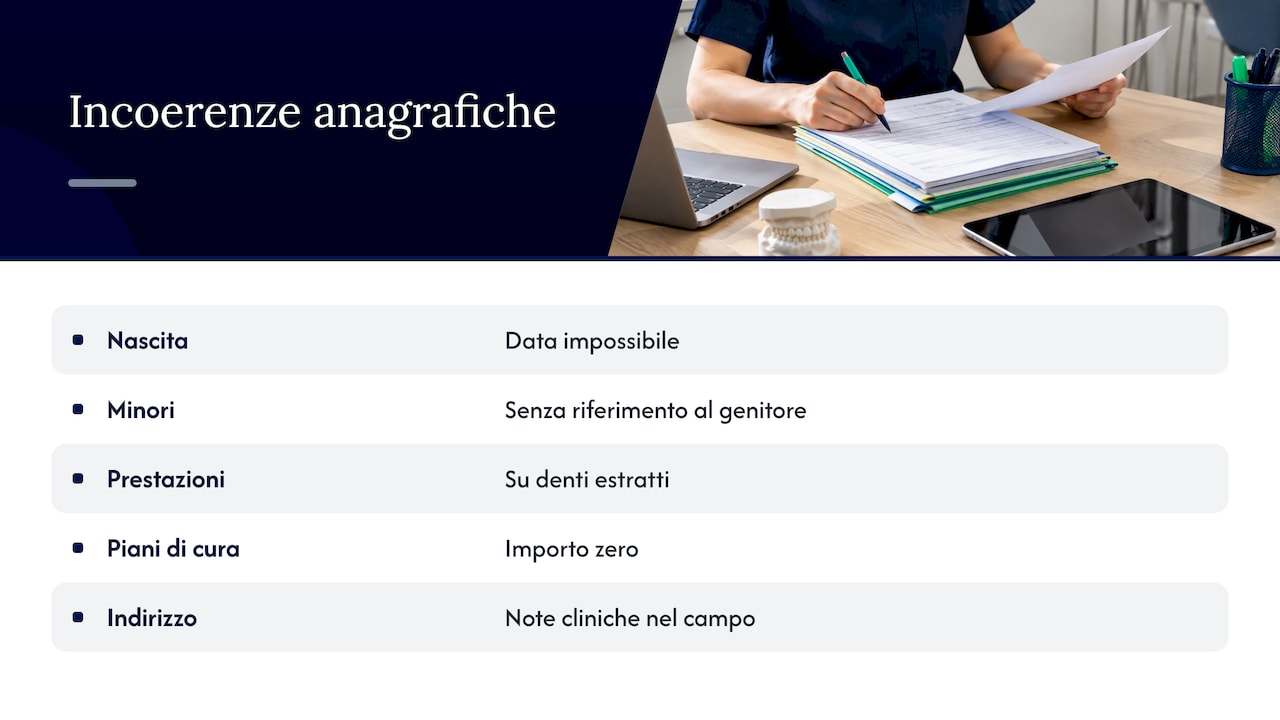
The most frequent inconsistencies to watch out for include: impossible dates of birth, minor patients without a linked parent/guardian, procedures logged on already extracted teeth, treatment plans with zeroed amounts, and clinical notes entered into the address field.
What to migrate and what to archive
Not everything needs to enter the new software as active data. A good rule of thumb:
Migrate completely: active patients, clinical chart and odontogram, periodontal history, ongoing treatment plans, valid estimates, open balances, consents, recalls, and upcoming appointments.
Archive in readable format: patients inactive for many years, expired estimates, outdated fee schedules, obsolete administrative notes.
Retain separately, in compliance with standards: tax and fiscal documents.
Regarding invoices, there is a distinction that many practices confuse. The Italian Revenue Agency, in circular no. 14/2019, differentiates between document consultation, which is temporary, and compliant digital archiving (conservazione a norma), which lasts ten years. The fact that the old management software shows you invoices does not mean they are stored in compliance with statutory rules. The Revenue Agency's guide on electronic invoicing states that electronic invoices must be preserved according to the Digital Administration Code. The same guide notes that the Revenue Agency offers a free digital preservation service in the Fatture e Corrispettivi portal. Before migrating, ask your accountant to confirm where and how the tax documents of previous years are stored: this verification falls to them, as it depends on choices already made by the practice.
For medical records, the retention period must be defined in your privacy policy and verified with the practice's privacy or legal advisor. For the migration itself, what matters is that the clinical history is not lost: if a portion does not enter the new system, it must remain in a readable, secured archive.
Field mapping
No two management systems organize data in the exact same way. One has a structured "allergies" field, while the other keeps them in free-form notes. One logs procedures by tooth and surface, the other only by tooth. One provides three permission levels, another five. This is why the migration checklist emphasizes documented mapping of correspondences between old and new fields: it is what prevents data loss and misunderstandings during import.
In practice, prepare a three-column table: field in the old software, field in the new software, and conversion rule. In dentistry, the items requiring the closest attention are:
procedure codes and price lists, which must correspond one-to-one, otherwise estimates and statistics will become scrambled;
tooth and surface numbering, which must remain consistent within the odontogram;
treatment plan statuses (proposed, accepted, ongoing, completed), which have different names and meanings across systems;
free-form notes fields, where critical clinical details such as allergies or ongoing therapies are often hidden;
users and operators, to correctly attribute past procedures to the provider who performed them.
Every data point lacking a designated destination field must still have a decided outcome: a note, an attachment, or the archive. "We'll figure it out later" is the phrase that causes information to disappear.
Backup, documentation, and disaster recovery plan
Before deleting a duplicate or closing an estimate, perform a complete backup of the old software: database, images, attachments, signed documents. Then make a secondary copy on separate storage media, encrypted and stored off-site. A backup that no one has ever tried to restore is not reliable. Ask the vendor or your IT technician to run a test restoration on a separate computer and ensure the data opens properly.
The Data Protection Authority guidelines on electronic health records are written for healthcare facilities. Among the required measures, they highlight authentication and selective access authorization, access logging, and procedures ensuring data integrity, availability, and restoration. They serve as a solid framework for a private practice undertaking a migration as well.
Document everything in a brief migration dossier:
date and content of each backup, along with where it is stored;
cleaning rules applied (merging duplicates, inactive patients, closed estimates);
field mapping table;
who has access to export files and when they will be deleted;
outcome of the test migration and validation checks.
Export files contain plaintext health data. Do not email them or leave them sitting on your desktop. Once the migration is complete, securely delete them and record the deletion.
Privacy: what the data controller must do
The processing of health data is governed by the GDPR (EU Regulation 2016/679) and the Italian Privacy Code. Principles that the Privacy Authority highlights among data controller obligations include lawfulness, data minimization, accuracy, and storage limitation. Applied to migration, these translate into concrete actions:
Minimization: do not import data you no longer need into the new system.
Accuracy: cleaning patient records is intended precisely for this purpose.
Storage limitation: decide in writing what to archive, for how long, and what to delete.
Vendors: the new software vendor processes data on behalf of the practice, requiring a data processing agreement appointing them as a data processor.
Record of processing activities: update it with the new software, data storage location, and new security measures.
If you have a DPO or privacy consultant, involve them before starting, not after the migration is finished.
The test migration and final checks
The procedure that works, outlined in the migration checklist, always follows the same order: initial audit, cleanup and deduplication, documented mapping, testing in a staging environment, validation by end users, final import, and launch. In a dental practice, checks are organized as follows:
Totals comparison: active patients, future appointments, open estimates, and sum of balances must match between the old and new systems.
Sample of charts: select about twenty diverse patients (an ongoing orthodontic case, an implant case, a periodontal patient, a minor, a patient with numerous attachments) and compare the records one by one.
Clinical check: a dentist or hygienist verifies the odontogram, periodontal charting, and allergies on the sample.
Administrative check: front desk staff verifies balances, down payments, installments, and recalls.
Practical trial: in the test system, schedule an appointment, issue an estimate, and record a payment.
Discrepancy list: every difference must be logged, corrected, and re-verified before the final import.
For the definitive cutover, select a period with a light appointment book and set the day when the old software switches to read-only. From that point on, everything is recorded in the new system, while the old one remains available for consultation and verification.
Our point of view
Many practices postpone changing software because they dread the migration. That hesitation is understandable: the old system contains the clinical history of thousands of patients. For us, however, the critical point is not the technical transfer itself, but reaching it with organized data and firm decisions already in place.
That is why we provide data migration at no additional charge and approach it as a joint project with your practice. You decide how to clean your data because you know your patients best, and we help you turn those decisions into an orderly import. A clean chart from day one is also what allows voice chart entry, hands-free periodontal charting, and analytics to deliver their full value right away.
For multi-location groups, data cleaning is the perfect opportunity to take things a step further: standardization. Uniform procedure codes, identical treatment plan statuses, and consistent chart structures across all clinics. Doing this before migration is inexpensive; doing it afterward costs far more.
Matteo
Migrating to Treatbase without losing anything
Treatbase is cloud dental management software that fills out clinical charts via voice. It manages the appointment calendar, estimates, billing, collections, and automated patient reminders, complete with digital signing and archiving of consents and granular permissions for every team member. Data migration from your current system is straightforward, fast, and included at no extra cost, whether for a single practice or multi-location groups.
If you are preparing for a switch, discover Treatbase dental software and ask us how to structure your migration starting from your existing data.
Frequently Asked Questions
How much time does it take to clean data before migration?
It depends on the archive's size and how diligently it was maintained over the years. In a solo practice, the work typically spans a few weeks, requiring a few hours per week from administrative and clinical staff. It is best to start with an inventory: the resulting numbers will reveal the scope of the work ahead.
Can I migrate right away and clean the data later in the new software?
You can, but it is the costliest route. Imported duplicates and errors will compound across recalls, statistics, and billing, making them far harder to correct while the clinic is actively operating on the new system. By cleaning beforehand, you import reliable data just once.
Do I need to delete patients who haven't visited in years?
Not necessarily. They are typically marked as inactive and archived in a consultable format, establishing in writing how long to retain them pursuant to your privacy policy. Retention periods and deletions should be confirmed with the practice's privacy advisor.
Do past invoices need to be migrated into the new management system?
They can be transferred for reference purposes, but statutory digital preservation (conservazione a norma) of tax records is a distinct legal requirement that does not depend on your management software. Before retiring the old system, verify with your accountant where past years' invoices are preserved.
What happens to the data in the old management software after the transition?
Typically, the old system is kept in read-only mode for an agreed-upon duration to facilitate verification checks. Once the migration has been validated, access should be restricted and export files must be securely deleted, followed by updating your record of processing activities.