Multi-clinic dentist calendar: how to manage it without wasting hours
Organize the dentist's multi-location calendar and save time with views per location/chair, operator synchronization, and conflict rules.
Multi-clinic dentist calendar: how to manage it without wasting hours
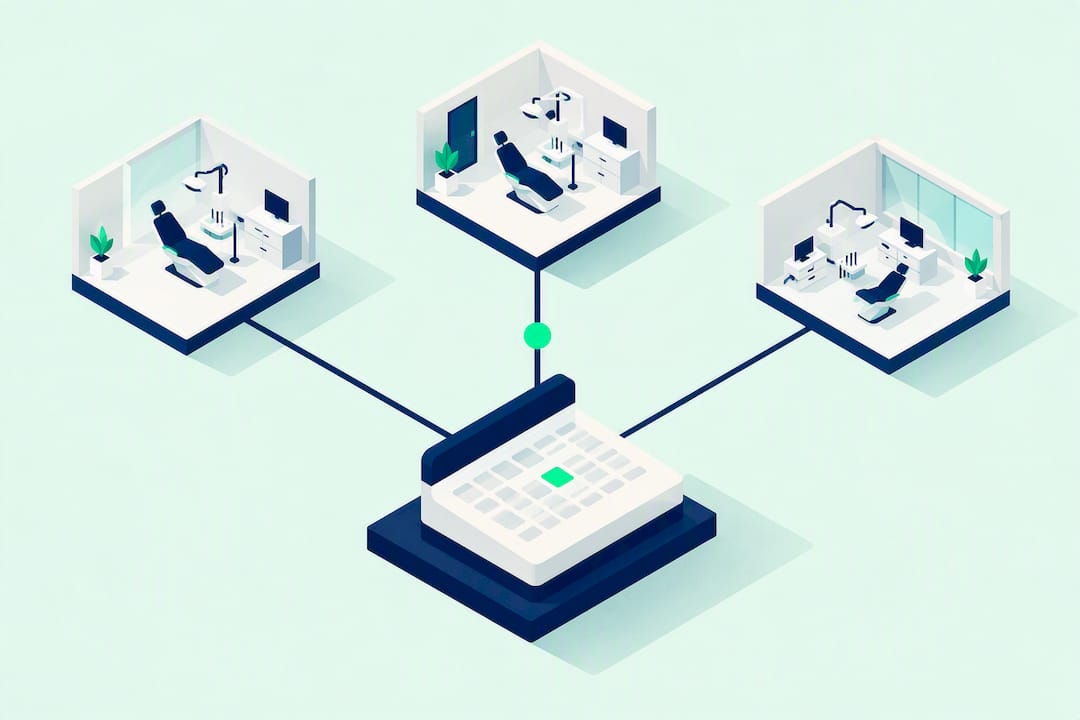
To truly manage a multi-clinic dentist calendar, you need three things together: a management software with separate views for clinic and dental chair, automatic synchronization between each operator's calendars, and written procedures to handle conflicts and unexpected events. Without this combination, each clinic ends up working like an isolated island disconnected from the others. Treatbase covers these three needs in a single system, with automations designed specifically for those who manage multiple clinics simultaneously.
In brief:
It is essential to choose a management software with separate views for clinic, dental chair, and operator to avoid congestion and booking conflicts between the different clinics.
Automations like multi-channel automatic reminders and smart waiting lists are essential to reduce no-shows and optimize chair usage across the entire network.
Before adopting software, clear procedures must be defined for managing conflicts, staff absences, and emergencies, as organizational planning is the true critical point.
A system should automatically integrate unified patient files, synchronize with external calendars, and allow detailed reporting on production, saturation, and performance of each clinic.
Migration and implementation require careful preparation, with clinic maps and staff training, to avoid errors and make the entire management process efficient.
TreatbaseManage multiple clinics in a single systemTreatbase simplifies the work of multi-clinic dental practices with automations, performance reports, and automatic patient reminders.Discover Treatbase
Table of Contents
What "multi-clinic calendar" means and why it differs from a single schedule
Essential features of a multi-clinic calendar management software
How to choose a multi-clinic management software: practical criteria and questions to ask the provider
Practical implementation: how to set up a multi-clinic calendar step-by-step
Automation and artificial intelligence in the multi-clinic schedule: what it can really do
Essential reporting and KPIs for monitoring a multi-clinic calendar
Who does what: roles and responsibilities in schedule management
How to handle conflicts and overlapping appointments between clinics
Emergency procedures and handling unexpected events in a multi-clinic calendar
Customizing hours and working days for each clinic
Managing staff holidays and absences in the multi-clinic calendar
What is really needed, based on field experience
How Treatbase manages the multi-clinic calendar, in practice
Sources
Frequently Asked Questions
What "multi-clinic calendar" means and why it differs from a single schedule
A multi-clinic calendar is not simply a larger schedule. It is a system that holds together shared patient files, differentiated availability for each clinic, and booking rules that change from one clinic to another. A practice with a single clinic can manage everything on a single sheet or elementary software. With two, three, or ten clinics, the logic changes radically: the same patient can book in one clinic and show up at another, a hygienist can alternate between two practices in the same week, and each clinic can have different opening hours, services offered, and price lists.
The typical problems that a true multi-clinic system solves are concrete and recurring:
Double bookings for the same patient in different clinics, because the calendars do not communicate with each other.
Duplicate patient records, with the same person registered twice with fragmented clinical data.
Inconsistent billing between clinics, with price lists and fees calculated manually and subject to error.
Underutilized dental chairs in one clinic while another has a full waiting list.
The advantage of solving these points is not only organizational. A practice that correctly synchronizes its clinics improves chair saturation, reduces the time the front office spends on the phone confirming or moving appointments, and gains real financial control over what each clinic and collaborator produces. Planning oriented around dental chairs, rather than individual doctors, tends to make the network more flexible: if a dentist is absent, the chair remains productive with another professional.
Essential features of a multi-clinic calendar management software
Not all dental software is designed to manage multiple clinics. The features that really make a difference in a multi-clinic network are these:
Views by clinic, chair, and operator: the reception must be able to switch from an overview of the entire network to that of a single chair in seconds, without complicated filters.
Centralized online booking: the patient chooses clinic, service, and time from a single interface, with synchronization to Google Calendar, iCal, and Outlook to avoid internal and external double bookings, as described by Reservio when talking about online bookings active 24 hours a day.
Differentiated price lists and commissions: each clinic can have its own price list, and the system automatically calculates what is owed to each collaborator based on the services provided in that specific clinic.
Smart waiting lists: if one clinic is full and another has availability on the same day, the system suggests the shift without the front desk having to physically call each patient on the list.
Multi-channel automatic reminders: SMS, email, and WhatsApp reduce last-minute cancellations and no-show rates, as confirmed by the automatic reminder features via WhatsApp described by Aralith for cloud dental management software.
Compliant digital archive: clinical records, consents, and documents must remain accessible from any clinic, with access controls differentiated by role.
A tip: Before signing a contract with a provider, ask for a demo with real data from your network, not standard demo data. A calendar that looks perfect with three test patients can behave differently with two thousand real patient files distributed across four clinics.
Choosing the nearest clinic or the one with the first free availability can now be automated: some centralized AI assistance systems manage incoming calls and directly propose the most suitable clinic, as shown in the case described by AI4CALL for medical practices with multiple clinics.
How to choose a multi-clinic management software: practical criteria and questions to ask the provider
Choosing the wrong software for a network of practices costs more time than choosing the wrong one for a single practice, because the error multiplies for each clinic. Here is what to check before deciding.
Native multi-practice support: the software must be designed for multiple clinics from the start, not "adapted" with additional modules that complicate configuration.
Unified patient files: a patient must have a single clinical file viewable from any clinic, with a complete history of services received anywhere.
Real scalability: ask what happens if you add a fifth or sixth clinic. Does the price grow linearly or in unexpected steps?
Verifiable integrations: synchronization with external calendars, payment systems, and messaging tools must work without daily manual intervention.
Reporting by clinic and by operator: without disaggregated data, you cannot understand which clinic is producing and which is dragging you into a loss.
During the meeting with the provider, ask direct questions: how long the data migration takes, who performs it, what happens if a patient has two duplicate records, and what the response times of technical support are in case of system blockages during opening hours.
Risk signals that should not be ignored are clear: if the provider tells you that synchronization between clinics must be done manually every day, if there is no granular control of permissions by role and clinic, or if you cannot get a report filtered by a single clinic, that management software is not designed for networks like yours.
Practical implementation: how to set up a multi-clinic calendar step-by-step
Switching to a multi-clinic calendar rarely goes wrong because of the software itself. It goes wrong because of poor preparation before the launch. Here is a sensible path.
Map clinics, chairs, and hours: before touching any software, list each clinic with its chairs, services offered, and actual opening hours, not the "official" ones that perhaps no one respects anymore.
Clean and unify patient files: during data migration, assign a unique identifier to each patient, for example, a clinic code plus a sequential number, to avoid duplicates and maintain a consistent history between clinics.
Configure calendar rules: set up views, colors by operator, online booking rules, and thresholds for automatic waiting lists.
Test internally before public launch: have the front desk work on the new system in parallel with the old one for one or two weeks before permanently turning off the previous schedule.
Train the front office specifically: whoever manages reception must understand how to move an appointment between clinics without generating double bookings.
Communicate the change to patients: a well-written automatic reminder during the transition reduces confused calls about "where is my appointment".
A tip: Roll out clinic by clinic, not all at once. Start with the clinic with the lowest volume of appointments: configuration errors cost less if they involve twenty patients a day instead of eighty.
Schedule management in Treatbase and the unification of patient files are designed precisely to accompany this type of migration without stopping clinical activity.
Automation and artificial intelligence in the multi-clinic schedule: what it can really do
Automation in the multi-clinic calendar does not mean eliminating human control. It means taking repetitive tasks that do not require judgment away from the front desk to leave them with the ones that actually do.
The most useful automations in a multi-clinic network are:
Automatic proposal of the clinic with the first free availability, or the one closest to the patient's home.
Automatic movement between free slots when one clinic is full and another has space on the same day.
Personalized reminders by the patient's preferred channel, with confirmation or cancellation managed without human intervention.
A centralized AI voice assistant can today manage incoming calls for the entire network, distributing bookings among clinics based on real availability, as illustrated by the practical case of AI4CALL. The concrete benefit is the reduction of the phone load on the reception, which stops chasing missed calls and can focus on welcoming patients in the clinic.
There are, however, limits to respect. Automation works well on clear and repeatable rules, such as moving between equivalent slots. On complex cases, such as a patient with specific clinical needs or a sensitive operator change, human supervision is still needed to assess the context before confirming.
Reporting and KPI essenziali per monitorare un calendario multisede
A multi-clinic calendar without reporting is just a schedule that is more complicated to read. The data that really matters for governing the network is few but decisive.
Saturation per chair: percentage of occupied slots compared to available ones, calculated clinic by clinic and chair by chair.
Average time per service: useful for understanding if one clinic has longer processing times than average, perhaps due to less modern equipment or staff less experienced in certain procedures.
Cancellation and no-show rate: if one clinic has twice the rate of the others, the problem is almost always in the quality of reminders or the times proposed.
Production by clinic and by operator: how much each clinic invoices, how much each collaborator generates, and how these numbers move month by month.
Reading this data regularly allows for concrete interventions: if a clinic has low saturation in the morning, part of the promotion of less requested times can be shifted precisely to that slot. If an operator has abnormal service times, it is worth understanding if additional training is needed or a rebalancing of the assigned slots. The financial management and monitoring of practice performance thus become a daily decision-making tool, not just an end-of-month report.
Who does what: roles and responsibilities in schedule management
In a multi-clinic network, confusion over roles generates more errors than the software itself. The front office of each clinic manages daily bookings, confirmations, and cancellations for patients of their own clinic, but must have visibility of the availability of others to propose shifts when needed.
The office manager, often at a centralized level, supervises the general calendar rules: defines standard hours, approves exceptions, checks that price lists are consistent across clinics, and intervenes when conflicts emerge that the front office cannot resolve on its own.
Collaborators, i.e., dentists and hygienists who work across multiple clinics, have the responsibility to communicate their weekly availability and any changes in good time. A collaborator who changes shifts without warning in advance can create a gap in the schedule that no one can cover in time.
Clarity on who can modify what in the system avoids overlapping responsibilities. A good management software allows setting differentiated permissions: the front office of one clinic can see but not modify the appointments of another clinic, while the office manager has full access across the entire network. Without this separation, it happens that two people modify the same appointment at different times, generating confusion that then falls on the patient.
How to handle conflicts and overlapping appointments between clinics
Overlaps between clinics almost always stem from two causes: a patient booked twice by mistake in different clinics, or a collaborator who works across multiple clinics and ends up with two appointments at the same time in different locations.
The first problem can only be solved with truly unified patient files.
The second problem concerns the availability of collaborators. A dentist who works on Tuesdays in two different clinics must have a personal calendar that the system reads before opening that slot for online booking in any clinic. Without this check, the reception of one clinic might confirm an appointment that the collaborator, in reality, cannot honor because they are already busy elsewhere.
When a conflict does occur anyway, a clear procedure is needed: who has priority to remain in the original slot, who takes care of calling the patient to be moved, and how quickly this contact must occur. The most organized multi-clinic networks set a maximum time limit, often within two hours of discovering the conflict, to contact the patient involved and propose an alternative. A system with smart waiting lists drastically reduces these episodes, because it automatically proposes the nearest alternative slot in the same clinic or another in the network.
Emergency procedures and handling unexpected events in a multi-clinic calendar
An unexpected event in a single clinic is a local problem. In a multi-clinic network, an unmanaged event propagates: if a clinic closes due to a technical problem or sudden staff absence, the appointments for that day must find room elsewhere, and quickly.
The first measure is to have a written protocol, not improvised on the spot. Who decides to temporarily close a clinic, who alerts the patients already booked, and which alternative clinic absorbs the most urgent appointments. Without this clear chain of decision-making, the morning of an emergency is spent wasting more time understanding who must do what than solving the problem itself.
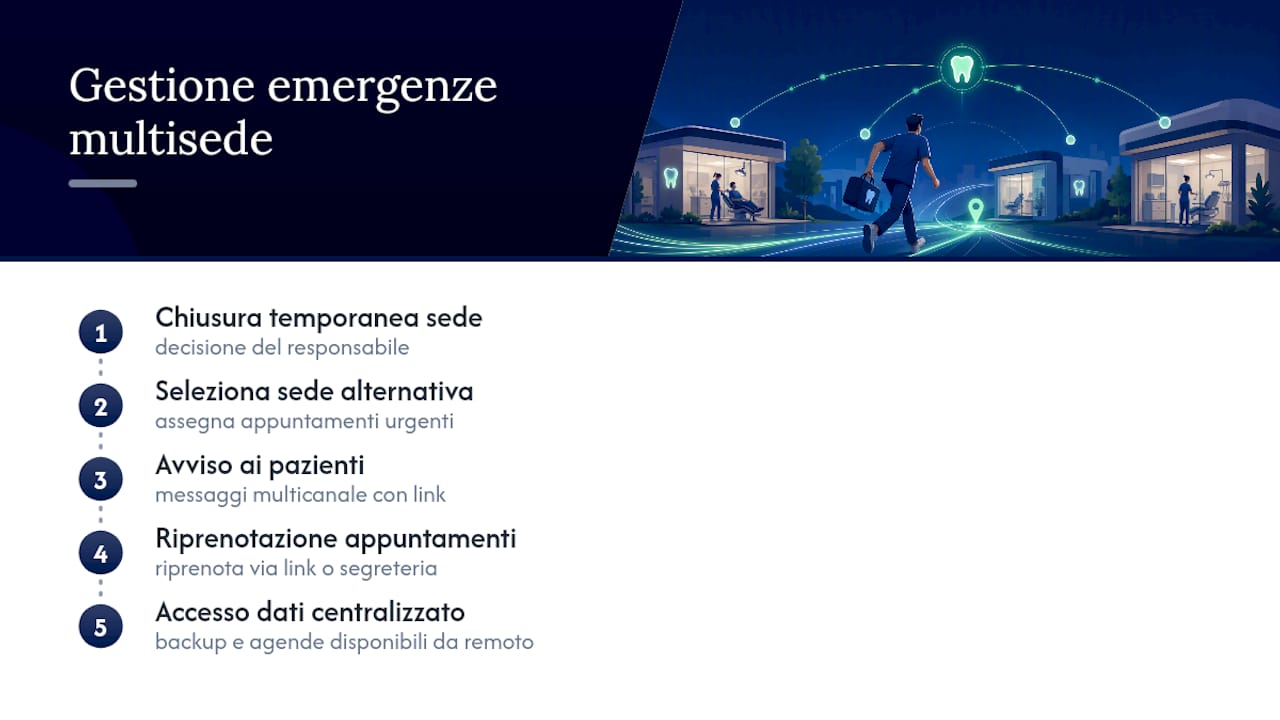
The second measure concerns automatic communication. A system with multi-channel reminders can send a message in a few minutes to all involved patients, with a link to rebook directly in the nearest alternative clinic or at the first available time. This avoids dozens of simultaneous calls on the same line, precisely at the moment when the reception already has other things to think about.
The third measure is data redundancy. If the centralized system is cloud-based, as in most modern management software, access to clinical data and the schedule remains available from any clinic even if a physical facility has a local technical problem. It is worth checking, before choosing a provider, what the guaranteed backup and recovery times are in case of failure, and if remote access remains operational during an outage.
Customizing hours and working days for each clinic
Each clinic of a dental network almost always has different hours. A city center clinic might open late to capture working patients, while a suburban clinic might close earlier and not open on Saturdays. A good multi-clinic calendar treats this difference as a rule, not an exception to be managed manually every time.
The correct configuration provides independent hours for each clinic, with the possibility to further differentiate by chair or operator. A hygienist who works only on Mondays and Wednesdays in a specific clinic must see their calendar automatically blocked on other days, without the reception having to remember it manually every week.
Seasonal variations complicate the picture further: reduced summer hours, local holiday closures, extraordinary openings in high-demand periods like before holidays. The system must allow programming these variations well in advance, so that online booking never proposes a slot that then turns out to be unavailable.
An aspect often underestimated is communicating these differing hours to patients, especially when they move between clinics in the same network: transparency on who opens when avoids misunderstandings that end up burdening the front office, as shown by several examples of Italian multi-clinic practices that dedicate specific sections of their website to the hours of each single clinic.
Managing staff holidays and absences in the multi-clinic calendar
Planned absences, such as holidays, are easily managed if planned well in advance and entered into the system before online booking opens for that period. A collaborator who communicates their holidays three months in advance allows the system to automatically block those slots across all clinics where they work, preventing a patient from booking an appointment online that then has to be cancelled.
Sudden absences, like sickness, are more delicate because they require a quick response. In this case, the multi-clinic calendar must allow seeing immediately which patients were booked with the absent collaborator, and automatically propose alternatives: another operator in the same clinic, or a move to another clinic in the network if the patient is willing to travel.
The practical rule that works best is to distinguish between total and partial absences. If the collaborator is absent for the whole day, it is best to immediately block the entire schedule for that day and start communicating with patients. If, on the other hand, the absence is only for a few hours, it is often more efficient to relocate individual appointments rather than cancel the whole day.
A centralized holiday and absence register, visible to all clinics and not just the one where the collaborator works, prevents different clinics from scheduling availability for the same person in the same period, an error more common than it seems in networks that still manage shifts with separate sheets per clinic.
What is really needed, based on field experience
Most guides on this topic focus on software features and overlook the most important point: a multi-clinic calendar almost always fails for organizational, not technical, reasons. The right software without clear procedures still produces confusion, while clear procedures with mediocre software limit the damage but do not solve the problem at its root.
The counterintuitive advice is this: before evaluating any provider, write the procedure for managing conflicts between clinics as you would want it to work, even if you don't yet have the software to apply it. This exercise immediately reveals which features are truly indispensable and which are just nice to have.
The other overlooked point is staff training during migration. Many networks invest in software and almost nothing in the adaptation time of the front desk, which ends up using only a tenth of the available features. Prioritizing front office training in the first few weeks matters more than choosing between two providers that are almost equivalent technically.
— Matteo
How Treatbase manages the multi-clinic calendar, in practice
Treatbase was created to eliminate exactly the friction described so far: double bookings, duplicate patient files, manual transcription of clinical records during visits. The system uses voice artificial intelligence to fill in charts by voice while the dentist works, with configurable calendar views by clinic, chair, and operator, appointment synchronization, and automatic patient reminders.
During the migration phase, the software imports existing records at no additional cost, unifying patient data scattered across different clinics into a single consistent profile. Practices that switch to this system report a significant saving of administrative hours each month, time that becomes available for direct patient care. The management of collaborators and their relative fees by clinic follows an automated logic that eliminates manual calculations at the end of the month, described in detail in the guide on collaborators and services.
If you manage a network of practices and want to see how multi-clinic schedule management in Treatbase works, the most direct way to understand it is to request a demo on the main product page and evaluate data migration with your real-world case.
Sources
Frequently Asked Questions
What is the best management software for dentists with multiple clinics?
There is no single best management software in absolute: it depends on how many clinics you manage and how differentiated hours and price lists are between them. Look for a system with native views for clinic and chair, unified patient records, and automations for reminders and waiting lists, such as those offered by Treatbase.
How do you manage the appointment schedule in a multi-clinic practice?
You need a centralized calendar that synchronizes all clinics in real time, with clear rules on who can modify what and written procedures for conflicts between clinics. Synchronization with external calendars like Google, iCal, and Outlook, described by Reservio, reduces the risk of double bookings.
How much does a multi-clinic management software cost for a dental practice?
The price of Treatbase is not published online: it is available on request by contacting the team directly through the website. Costs generally vary based on the number of clinics and users involved in the chosen plan.
How do you reduce no-shows with a multi-clinic calendar?
Multi-channel automatic reminders, via SMS, email, and WhatsApp, are the most effective leverage to reduce missed appointments, as confirmed by the features described by Aralith. A system that sends automatic confirmations and allows one-click rebooking further lowers the last-minute cancellation rate, especially when combined with dedicated tools like those of Ilikoo for booking security.
When is it worth switching to a multi-clinic system compared to multiple separate schedules?
It is worth switching to a unified system as soon as the network exceeds two clinics with shared staff, because at that point separate schedules begin to generate booking conflicts and duplicate records that are difficult to correct manually. The ideal time for migration is before opening a new clinic, not after.