Dental clinic cashing up: the correct step-by-step procedure
Cash register closing in the dental clinic: count cash and cards, submit daily receipts, separate documents with a checklist to avoid mistakes.

Dental practice cash register closing: the correct step-by-step procedure
At the end of the shift, count, record, submit: this is the sequence that every front desk should follow daily. The cash and POS count must be reconciled with registered sales, transaction data must be sent from the telematic cash register within the required deadlines, and administrative documents must be separated from clinical ones before archiving them. A checklist shared with the staff reduces errors and wasted time.
In brief:
It is crucial to reconcile cash and POS transactions immediately with registered sales to avoid discrepancies that are hard to track.
Automatic submission of receipts via the telematic cash register can take up to 12 days to complete; beyond this limit, the "out of service" status must be set.
For healthcare services, invoices can be issued without transmitting them to the Interchange System (SdI), while transaction receipts must always be recorded using the telematic cash register.
Physically and digitally separating administrative documents from clinical ones during closing reduces the risk of violations and simplifies checks by the Privacy Authority.
An integrated practice management software facilitates daily reconciliation, reduces errors, and allows for more efficient management of cash register closing.
Treatbasetreatbase.comSimplify cash managementTreatbase integrates billing and procedure tracking, helping dental practices run each day with fewer mistakes.Discover Treatbase
Table of Contents
Step-by-step procedure for cash register and reception closing
Telematic cash register: how transmissions and emergency procedures work
Invoicing and payments for healthcare services: practical rules
Privacy and data separation at the front desk during closing
Accounting reconciliation and cash conversion cycle control
Practical checklists and templates for closing
Practical example: how integrated management software supports closing
Perspective: responsibility and governance in cash closing
How to get started with Treatbase to simplify closing
Frequently Asked Questions
Sources
Step-by-step procedure for cash register and reception closing
Cash register closing only works if it always follows the exact same order, regardless of who is working at the front desk that day. A written protocol prevents each team member from improvising their own method, which over time creates discrepancies that are difficult to trace.
Count the cash in the register and immediately compare it against the total sales recorded in the system throughout the day, noting down every difference, even minor ones.
Check POS and card transactions, verifying any reversals or refunds processed in the last few hours and printing the terminal's end-of-day closing report.
Record receipts and invoices in the management software or on the paper ledger, including down payments received and installments of payment plans agreed upon with patients.
Temporarily store the day's paper documents in a dedicated folder and proceed with scanning for digital backup, always keeping administrative documentation separate from clinical files.
Have the shift supervisor sign a closing report, confirming the amount counted, any discrepancies, and any corrective actions already initiated.
The most common weak point is the third step: deposits and payment plans are often communicated verbally or jotted down on loose scraps of paper, only to be entered the following day with a margin for error. Recording them at the exact moment the money is collected, directly in the software, eliminates that intermediate step and ensures the final count aligns with what was actually received.
Signing the closing report is not just bureaucratic red tape: it is the tool that makes it possible, weeks later, to trace who balanced the register on a given day and with what result. In the event of an audit or an internal dispute, it is often the only document capable of reconstructing the sequence of events.
Telematic cash register: how transmissions and emergency procedures work
The telematic cash register (RT) automatically generates and transmits the daily transaction summary file to the Revenue Agency at the time of closing, without requiring manual intervention by the staff under normal conditions. The issue arises when the practice's internet connection is down or unstable.
In these cases, users of a telematic cash register have a maximum deadline of 12 days to transmit the transaction data, with the option to manually upload the sealed file through the Invoices and Receipts portal when automatic transmission fails.
The maximum grace period granted by regulations to resolve a failed transmission of receipts due to connectivity issues is strictly defined, beyond which the practice risks being deemed non-compliant by the tax authorities.
To properly manage a prolonged interruption, the standard operating procedure includes several steps:
Check immediately whether the RT truly failed to transmit by checking the device status and the operations log.
Extract the sealed file generated by the RT during the days without a connection, following the device manufacturer's specific instructions.
Log in to the Invoices and Receipts portal and proceed with the manual upload of the file within the 12-day deadline.
If you anticipate that the disruption of business will exceed 12 days, set the RT status to "out of service" with code 608 via the portal, to formally justify the lack of transmissions during the closure period.
Operational guides from the Revenue Agency dedicate specific sections to how to report the interruption of business and manage the status of the telematic cash register during extended practice closures, including summer vacations or renovation works.
Invoicing and payments for healthcare services: practical rules
Healthcare services provided to individuals for medical treatment follow a different rule compared to standard invoicing: they must not be sent via the Interchange System (SdI). This exemption protects the confidentiality of patient health data, which would otherwise pass through a shared channel with the tax authority.
In practice, whoever handles the cash closing must follow a few operational rules:
Issue the invoice for the healthcare service in paper or electronic format, but without transmitting it via SdI.
Verify whether the service is among those that must be reported to the Health Card System (Sistema Tessera Sanitaria), following the standard procedures established for that channel.
Record the payment in the practice management software at the same time you close the register, linking it to the corresponding invoice or receipt.
For deposits and installment payment plans, record the date, the amount paid, and the remaining balance due, to maintain a clear overview during daily closing.
Retain a copy of the day's tax documentation, which will be useful in the event of a tax authority audit.
A common mistake is treating the receipt of a deposit as a "pending" item to be settled later. Postponing registration to the end of the month instead of at daily closing makes it much harder to pinpoint discrepancies as they occur, rather than when they accumulate.
Privacy and data separation at the front desk during closing
The closing phase is also the time when the risk of exposing health data in public areas is highest: documents left on the counter, open patient charts, printouts waiting to be filed. The Privacy Authority's guidelines on electronic health records require collecting only data strictly necessary for administration, applying the principles of relevance and data minimization even during routine tasks like the evening close.
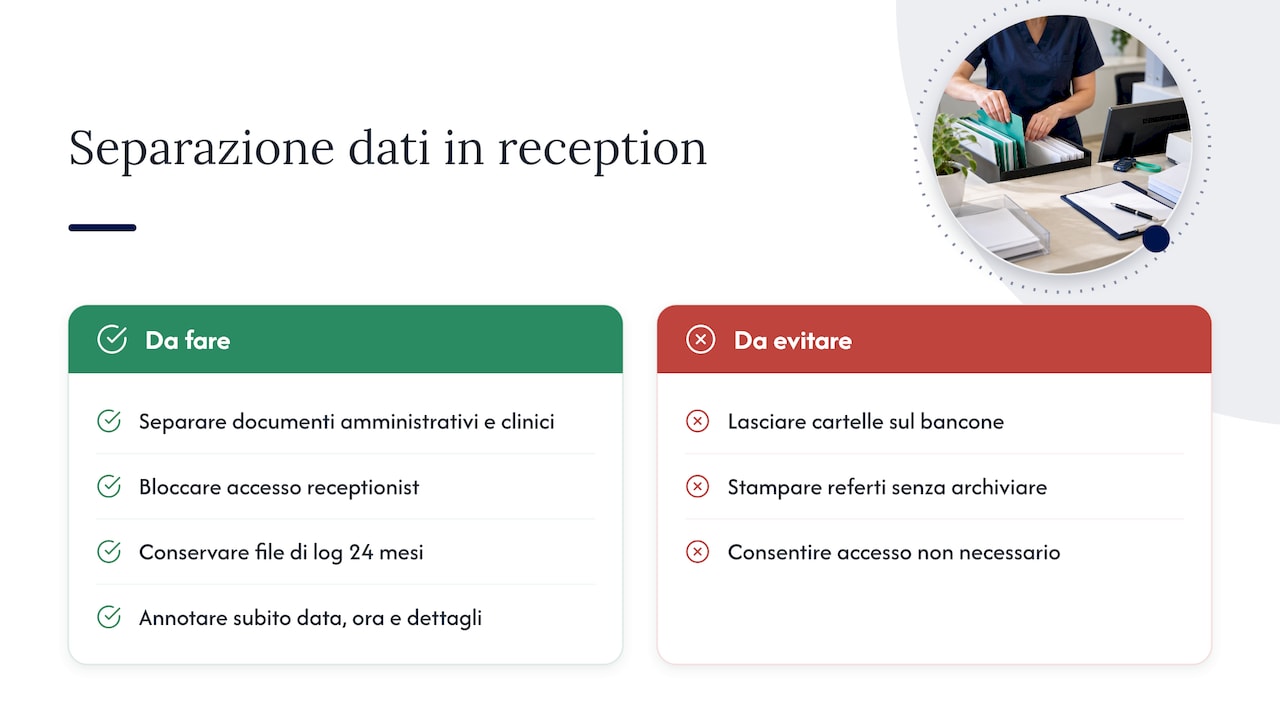
In practice, this means physically and digitally separating administrative documents, such as receipts and cash reports, from clinical ones, such as charts and medical reports, before proceeding with scanning or archiving. Front-desk staff do not need access to the patient's medical records to complete the cash register closing: keeping the two workflows distinct reduces the risk of unnecessary access.
The Privacy Authority also mandates access tracking and the retention of corresponding log files for at least 24 months—a tool that, in the event of an inspection, proves that adequate organizational measures have been adopted. Separating administrative data from clinical data at the front desk significantly reduces the risk of breaches and simplifies internal audit procedures.
Tip: If you suspect unauthorized access or the loss of documents containing health data, immediately record the date, time, and details of the incident: prompt reconstruction is crucial for assessing whether a notification to the Privacy Authority is required.
Accounting reconciliation and cash conversion cycle control
The cash cycle describes the time that elapses between the provision of a service and the actual collection of the corresponding payment, and explains why revenue and cash flow can diverge even in a practice working at full capacity. Growing clinical production does not automatically guarantee more available cash flow if patient receivables and payment extensions stretch out in tandem.
Daily closing is the most immediate observation point for catching this mismatch. Reconciliation should always focus on the same components:
Compare total cash and POS collected with the amounts recorded in the system for that day.
Verify weekly that bank deposits match the cash actually deposited, not just what was counted in the register.
Monitor outstanding patient receivables, distinguishing between standard payment plans and overdue installments.
Monitor trends in average collection time compared to previous weeks, not just total invoiced revenue.
In many practices, the true cause of cash flow strain is not a decline in production, but a systematic lengthening of collection times: simple measures like adequate down payments, written payment agreements, and automated reminders resolve over 60% of the cash flow discrepancies identified in this type of analysis.
Asking for a deposit proportionate to the value of the service, even before beginning treatment, remains perhaps the most effective leverage point to shorten the cash cycle without altering the clinical workflow of the practice in any way.
Practical checklists and templates for closing
A concise checklist, posted at the front desk or integrated into the software, reduces reliance on the memory of whichever team member is on duty that evening.
Count cash and POS totals, compare against system totals.
Record receipts, invoices, deposits, and installments collected during the day.
Separate administrative and clinical documents prior to scanning.
Sign the closing report, indicating any discrepancies.
Report immediately to the practice administrator any anomaly exceeding a predetermined threshold.
For each discrepancy, a minimal log template should record the date, expected amount, actual amount, probable cause, and the person reporting the issue. When the difference exceeds the threshold set by the practice, the escalation procedure requires immediate notification of the practice manager, rather than postponing until the following day. Integrating checklists and logs directly into your management software, instead of maintaining them on separate paper sheets, makes them much easier to locate in the event of an audit.
Practical example: how integrated management software supports closing
Management software that combines payments and financial reports within the same platform reduces manual closing steps: collection, recording, and reconciliation occur in the same workflow, without having to enter the same data twice.
On Treatbase, invoice management and procedure monitoring are designed to remain linked from the moment of payment, while data migration from another system is handled at no extra charge. This type of integration does not replace the checks described above, but it cuts down the time required to carry them out each day.
Perspective: responsibility and governance in cash closing
Whoever signs the closing report is, in effect, the guarantor of the practice's liquidity and compliance for that day. A written procedure is only as good as the staff's commitment to following it every time, not just when time permits: for this reason, continuous training matters far more than any printed checklist.
— Matteo
How to get started with Treatbase to simplify closing
We bring financial reporting, payment processing, and document backup together in a single platform, so that cash register closing requires fewer manual steps each evening.

Check out the tutorials on payments and financial management.
Learn how we manage data and patient records in the dedicated section.
Request a demo on Treatbase to see the closing workflow applied to your practice.
Frequently Asked Questions
What does the local health authority (ASL) check in a dental practice?
Local health authority (ASL) inspections primarily focus on health and hygiene requirements, practice licensing, and proper management of medical devices, rather than directly on cash register closing procedures. However, well-organized administrative documentation facilitates any audit requiring the reconstruction of the practice's activity.
Is electronic invoicing still mandatory for dentists?
For healthcare services provided to individuals for medical treatment, the invoice must not be transmitted via the Interchange System (SdI), and can therefore be issued in paper or electronic format outside that channel. Conversely, the transmission of daily receipts via a telematic cash register remains standard practice for daily intake.
How much revenue should a dental practice generate?
There is no mandatory minimum revenue threshold that applies universally: each practice defines its own goals based on fixed overhead, the number of practitioners, and location. The most useful metric to monitor, as explained in the cash cycle analysis, is not just total revenue, but how much of that revenue actually turns into available cash flow.
What regulations govern dental practices in Italy?
A dental practice is subject to tax regulations regarding the transmission of receipts and the invoicing of healthcare services, in addition to personal and health data protection obligations defined by the Privacy Authority. Specific rules vary based on the legal form of the practice, the number of practitioners, and the types of treatments provided, making it advisable to verify case by case with a tax or legal advisor.
How do you set the telematic cash register to out-of-service mode?
When the suspension of activity exceeds the 12-day window allowed for transmitting receipts, the telematic cash register can be set to "out of service" status using code 608 via the Invoices and Receipts portal. This notification formally justifies the lack of transmissions for the specified period.
Sources
Guidelines on the electronic health dossier - Italian Data Protection Authority
The cash conversion cycle in the dental practice | Dentista Manager