How to choose dental practice management software: 2026 guide
How to choose dental practice management software: voice charting, periodontal charting, Health Insurance Card System (Sistema TS), cloud privacy, and data migration. Criteria and checklist.

How to Choose Dental Practice Management Software: 2026 Guide
To choose dental practice management software wisely, start with where your practice is currently wasting time, not with a list of features. Five questions truly matter: how much time it costs you to fill out patient records, how you manage your schedule and recall appointments, whether billing complies with the rules of the Health Insurance Card System (Sistema Tessera Sanitaria), how health data is protected in the cloud, and how painful the transition from your current software will be. Below you will find criteria ranked by priority, the checks to carry out during a demo, and a method to migrate without losing a single piece of data.
TreatbaseChoose management software that cuts down on bureaucracyTreatbase uses voice AI to fill out medical records and integrates invoices, performance tracking, and automated reminders.Discover Treatbase
In Brief
Start with chairside time: the right practice management software reduces clinical bureaucracy, beginning with medical records and periodontal charting, which can be filled out via voice dictation without taking off your gloves.
Billing must comply with Italian regulations: for expenses submitted to the Sistema TS, electronic invoicing via SdI is not issued, and starting from 2025 data transmission is annual.
Cloud, yes, but with real technical measures: the Data Protection Authority (Garante Privacy) penalizes those who use management software without adequate updates and access controls, and the responsibility remains with the data controller.
Migration must be planned: data inventory, complete dry run, spot checks, and keeping the old software in read-only mode until everything is verified.
Think about tomorrow’s practice: more practitioners, multiple locations, multiple languages. Software that does not scale will force you to switch again.
Table of Contents
What dental management software needs to do today
Selection criteria, in order of priority
Voice dictation and artificial intelligence: what to verify
Cloud and health data: privacy questions to ask
Multiple practitioners, multiple locations, multiple languages
Switching management software without losing data
The true cost: consider the first year
Our point of view
Treatbase: the management software that fills out records by voice
Frequently Asked Questions
Sources
What dental management software needs to do today
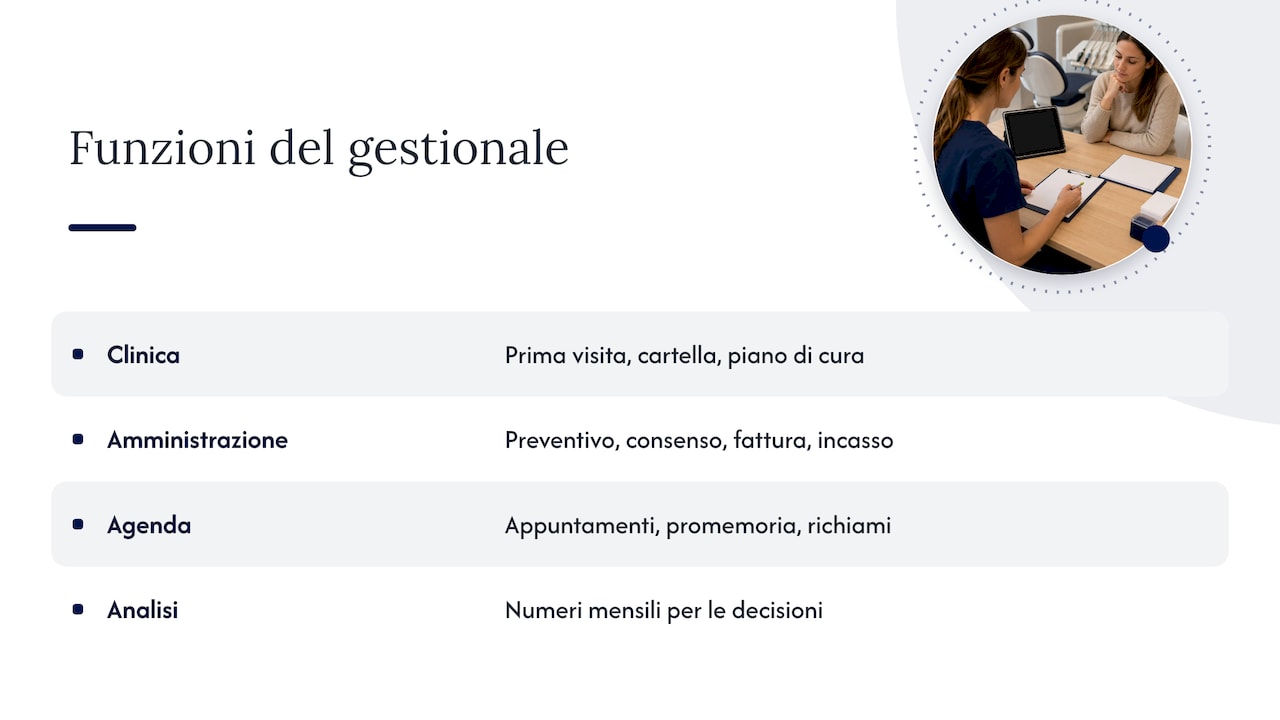
Once upon a time, practice management software was just an appointment book with patient contact details. Today, it is the system that handles the entire practice workflow: the initial consultation, medical records, treatment plans and quotes, signed consents, appointments and reminders, invoicing, payments, six-month recalls, and, at the end of the month, the analytics showing how the practice is performing.
If these activities live across different tools (paper by the chair, an Excel sheet for quotes, the front desk phone for recalls), every transition introduces a risk of error and a waste of time. The fundamental criterion is therefore simple: how many tasks does the software truly centralize, and how many hours does it return to clinical work.
There is also a second, often overlooked dimension. Software used only for scheduling and invoicing delivers little value. Used to its full potential, it becomes the tool with which the practice owner analyzes data and makes decisions: which treatments are most profitable, how many quotes are accepted, which chair sits empty on Thursday afternoons.
Selection criteria, in order of priority
Before watching demos, rank the criteria based on their importance to your practice. This table serves as a customizable starting point.
Criterion | What to ask in a demo | Why it matters |
|---|---|---|
Medical records and charting | How many clicks (or words) does it take to record a full periodontal probing? | It is the activity that steals the most chairside time |
Voice dictation and AI | Can I dictate during the examination and review the draft before saving it? | Eliminates manual transcription and paper notes |
Scheduling and reminders | Do reminders send automatically? Can I manage multiple chairs and practitioners? | Fewer gaps in the schedule, fewer front-desk phone calls |
Quotes, invoicing, and collections | Does a quote turn into an invoice without retyping? Can I see outstanding balances per patient? | Fewer errors, accounts receivable under control |
Security and privacy | Where is the data hosted, who has access to what, and how are accesses logged? | Responsibility toward the Privacy Authority falls on the data controller |
Data migration | What is migrated, how long does it take, and at what cost? | It is the main concern when switching management software |
Multi-location and multilingual | Can I standardize charts and invoicing across locations? Is the interface available in multiple languages? | Crucial for groups, DSOs, and practices with international teams |
Performance analytics | What reports are available without exporting data to Excel? | Turns management software into a business intelligence tool |
Medical records and periodontal charting
The patient chart is the clinical core of the management software and the area where differences between solutions are most apparent. In a demo, do not settle for just viewing the odontogram: ask to record a real case live, including diagnosis, treatment plan, and clinical notes.
Periodontal charting deserves its own test. A complete probing examination means six sites per tooth, pocket depths, bleeding, recessions, and mobility. If the practitioner has to call out values to an assistant who types them, or worse, take off their gloves to type them in themselves, charting becomes slow and prone to errors. The question to ask is: can I record periodontal probing hands-free, using voice commands?
Scheduling, recalls, and reminders
The calendar must show dental chairs, practitioners, and appointment types at a glance, allowing the front desk to reschedule a visit without an endless chain of phone calls. Check how periodic recalls are handled (cleanings, check-ups, post-surgical follow-ups) and whether they are sent automatically or require a list that must be called manually.
Regarding missed appointments, the key factor is automated reminders: a message sent without anyone having to remember to do so is a message that always goes out. In the demo, ask when they are sent, whether the patient can confirm, and how confirmations appear on the schedule. Every recovered empty chair is revenue brought back into the practice.
Quotes, invoicing, and Sistema TS
Two things matter here: workflow fluidity and Italian regulations.
Fluidity: the treatment plan should convert into a quote, and the quote into an invoice, without retyping line items or amounts. Whoever manages payments should be able to view deposits, installments, and outstanding balances per patient at any time.
Regulations: according to the Italian Revenue Agency (Agenzia delle Entrate), those required to submit healthcare expenses to the Sistema TS cannot issue electronic invoices via SdI for those same expenses. Moreover, the submission frequency has changed multiple times: for expenses incurred from 2024 onwards, submission was semi-annual, as noted in Circular No. 9 of May 2, 2024, whereas from expenses related to 2025 onwards, submission has reverted to annual pursuant to Legislative Decree 81/2025. Deadlines may change again: verify the latest dates with your accountant and on the Agency’s portal, and ensure that the software’s billing workflow aligns with how your practice fulfills its obligations.

Performance analytics
A solid management system shows you, without requiring exports, how much you have produced and collected—broken down by practitioner and treatment—how many quotes were accepted, and how many appointments were cancelled. If the practice owner delegates daily operations to an office manager, reports become the space where strategy is discussed: the office manager runs day-to-day operations, while the owner analyzes the numbers and makes decisions.
Voice dictation and artificial intelligence: what to verify
Voice AI is the innovation that most significantly transforms chairside work: instead of typing after the consultation, the clinician speaks during the visit, and the medical record is populated automatically. To assess it properly, the literature on digital scribes provides a clear methodology. A literature review on the validation of digital scribes highlights the need to evaluate accuracy, safety, documentation quality, and workflow impact in real clinical encounters, emphasizing an essential step: the clinician reviews and edits the draft before it is finalized in the patient chart.
In practice, during a demo:
Dictate a real case, using the terminology you use every day, not a script prepared by the vendor.
Look at the draft: is it structured into the appropriate chart fields, or is it just a single block of text?
Edit and confirm: it must be simple to review, amend, and validate before saving.
Test voice charting: dictate a periodontal probing chart and verify that values land on the correct sites.
Time it: compare the time taken against your current workflow. That is the number that tells you how many hours the software will give back to the practice.
The final sign-off always remains with the healthcare professional: AI prepares the draft, you validate it. This is how dictation becomes an accelerator without sacrificing clinical control.
Cloud and health data: privacy questions to ask
Cloud-based software frees you from on-premise servers, manual backups, and software updates, allowing you to work from any location. However, the data you handle is among the most sensitive. The Data Protection Authority emphasizes that a breach of health data can compromise the confidentiality of the doctor-patient relationship, leading to severe consequences for individuals.
In its decision of June 18, 2026, the Authority fined healthcare facilities using cloud software without adequate technical safeguards—such as missing updates and insufficient access controls—reiterating that liability lies with the data controller. The takeaway is that compliance is not a one-time checklist: it requires ongoing, risk-proportionate measures, such as encryption, access logs, and regular updates.
Questions to ask the provider:
Access and permissions: can I configure role-based access (dentist, hygienist, front desk, external contractor)?
Audit trails: is there an immutable log of who opened or edited a chart?
Updates: who manages them and how frequently?
Consents: are informed consent forms digitally signed, archived, and linked directly to the patient's record?
Documentation: does the vendor provide the necessary documentation to support my register of processing activities?
Regarding this last point, the Garante clarifies that even organizations with fewer than 250 employees must maintain a register of processing activities when processing special categories of data, such as health data. A dental practice fully falls into this category. For details on your register and appointing the vendor as a data processor, consult your privacy advisor or DPO.
Multiple practitioners, multiple locations, multiple languages
Many practices start with a single owner and one chair, then grow to include associates, hygienists, and a second clinic. Anyone taking over an existing practice often inherits legacy software and inconsistent habits across staff. Multi-location groups need standardized data for accurate comparison. In all these cases, the management software must provide:
Management of team members and permissions, with distinct role-based profiles and individual schedules per practitioner.
Standardized clinical records and invoicing across locations, so that a patient seen in Milan can be treated in Monza with the same clinical history and protocols.
Comparable reporting by location and by clinician.
A multilingual interface, essential for practices with international staff, non-native patients, and groups operating outside Italy, such as in Switzerland or Spain.
Even if you only operate a single practice today, ask these questions anyway: switching management software every time your practice grows is an avoidable and costly burden.
Switching management software without losing data
Fear of data migration keeps many practices tied to legacy software they have outgrown. With a structured methodology, the transition is entirely manageable. Here are the steps to coordinate with the vendor:
Inventory: list everything that must be transferred. Demographics, charts, treatment plans, quotes, invoices, balances, attached documents and images, consents.
Data quality: identify duplicates (the same patient registered twice) and inconsistently filled fields, and determine how to clean them up.
Field mapping: every data field in the legacy software must have a destination in the new one. Ask to review the mapping scheme.
Full dry run in a staging environment: a complete test migration before the final go-live.
Reconciliation: compare the totals. Total patients, invoice counts, account balances, and ensure documents and attachments are linked to the correct patient.
Spot checks: open ten real patient files with diverse clinical histories and compare them directly against the original system.
Go-live and safety net: schedule the cutover date, establish a rollback plan, and keep the legacy software in read-only mode until all checks are complete.
Choose a quieter period in the practice schedule for the cutover, and clarify upfront what is included: timelines, staff training, and especially migration fees, which with some vendors can add substantial first-year costs.
The true cost: consider the first year
The monthly subscription is only part of the equation. To accurately compare solutions, calculate the total cost of ownership for the first year: subscription fees per user or location, potential migration fees, onboarding and training, and any hardware or servers required if the software is on-premise. Then weigh this against saved time: the front-desk and chairside hours the software reclaims each month. A solution that costs slightly more but eliminates manual data entry quickly pays for itself.
Our point of view
For years we have seen practices choose management software based solely on a checklist of features, only to continue spending their evenings catching up on chart notes. For us, only one metric matters: how much time the software returns to patient care.
That is why we built Treatbase around voice artificial intelligence. The dentist speaks, the chart fills out automatically, and manual transcription disappears. Periodontal charting is done hands-free using voice commands—no need to remove gloves or rely on an assistant taking dictation. According to our estimates, dental practices can save over 1,000 hours per month.
We also know that the biggest hurdle is the fear of migrating. Data migration with us is smooth, fast, and carries no additional fees. For practices operating across multiple locations or languages, we provide standardized charting and billing, granular permissions for every team member, and built-in analytics to understand practice performance.
Matteo
Treatbase: the management software that fills out records by voice
Treatbase is the cloud dental management software powered by voice AI: voice-dictated clinical notes, hands-free periodontal charting, scheduling with automated patient reminders, billing, payment processing, digitally signed and archived consents, team management and permissions, and performance analytics. It is multilingual, designed for both solo practices and multi-clinic groups, and data migration from your existing software is free.
If you are considering a change, discover Treatbase dental management software and book a demo using one of your real clinical cases.
Frequently Asked Questions
Cloud-based vs. on-premise dental software: which is better?
The cloud eliminates on-site servers, manual backups, and manual software updates, while enabling access from multiple locations or remotely. The choice should be evaluated based on the vendor’s security controls: access governance, audit trails, and consistent updates. With these safeguards in place, cloud software is today the most practical solution for the vast majority of practices.
How long does it take to switch to new dental management software?
It depends on the volume and quality of the data to be migrated and the number of locations. The lowest-risk approach involves a test migration, spot checks, and retaining the legacy software in read-only mode for a transition period. With Treatbase, data migration is fully handled at no extra charge.
Does voice dictation work with dental terminology?
This is precisely what you should evaluate in a demo by dictating a real case using the terminology you use every day. Verify that the output populates the correct fields in the patient record and that it is straightforward to review and approve. Final clinical sign-off always remains with the practitioner.
Does the software need to send data to the Sistema Tessera Sanitaria?
The legal obligation to transmit healthcare expenses falls upon licensed dental practitioners—meaning the practice itself—not the software alone. Starting from expenses incurred in 2025, transmission is annual. Check with your accountant for current deadlines and ensure the software’s billing module seamlessly supports your compliance process.
Does dental practice management software help reduce no-shows?
Yes, particularly through automated reminders that dispatch without requiring front-desk intervention, coupled with confirmations that reflect directly on the schedule. Combined with automated periodic recall workflows, they significantly cut down on appointment gaps and manual follow-up calls.
Sources
Italian Revenue Agency (Agenzia delle Entrate): FAQ on invoices for healthcare services
Italian Revenue Agency (Agenzia delle Entrate): FAQ on healthcare expenses
Italian Revenue Agency (Agenzia delle Entrate): Circular No. 9 of May 2, 2024
Data Protection Authority (Garante Privacy): decision of June 18, 2026
Data Protection Authority (Garante Privacy): decision of June 8, 2023
Data Protection Authority (Garante Privacy): register of processing activities
Validating Digital Scribes: A Scoping Review (Journal of Medical Systems)