Digital patient check-in: how it works and why to adopt it
Discover how digital patient check-in reduces queues and administrative time, and can be integrated with your practice management software.

Digital Patient Check-in: How It Works and Why to Adopt It
Digital patient check-in allows patients to register their arrival at the clinic via kiosk, app, or QR code, without going to the reception desk. The operational advantage is immediate: shorter queues in the waiting room, less time wasted by staff on repetitive administrative tasks. This guide explains how it works, what results to measure, and how to integrate it with the practice management software.
In brief:
Digital check-in reduces average waiting times in clinics by between 30% and 40%, freeing up resources and decreasing physical queues.
It is essential to integrate the system with the practice management software to avoid duplicate work and ensure real-time updates of patient data.
Advanced electronic signatures and verification via health insurance card or NFC are key elements to guarantee legal validity and GDPR compliance.
It is important to run a pilot test for a few weeks to identify and correct any issues, avoiding rushed practices that multiply errors.
For an effective transition, one must focus on post-check-in data management and the traceability of digital consents, not just on the chosen hardware.
TreatbaseSimplifies practice managementTreatbase helps dental practices reduce bureaucracy with voice management, invoices, treatments, and automatic reminders.Discover Treatbase
Table of Contents
How digital patient check-in works
How much time is saved with digital check-in?
How to implement digital check-in in the practice
Security, privacy, and identity verification
Integrating digital check-in with the management software: the Treatbase case
What really matters in this transition
Treatbase: the management software that absorbs digital check-in
Sources
Frequently asked questions
How digital patient check-in works
The term covers various methods, all designed to allow patients to complete the steps that previously took place at the reception desk in advance. The self-check-in kiosk remains the most widespread option in high-flow facilities: the patient enters their tax code or health insurance card and confirms their presence in a few seconds. In parallel, three variants are spreading:
Patient App: check-in takes place from a smartphone, often even before arriving at the clinic.
QR or NFC: a code sent via SMS or email activates registration without installing anything.
Browser check-in: useful for those who are not familiar with apps, a link received on the phone is enough.
The typical flow follows a precise sequence: booking, pre-check with clinical questionnaire, identity verification, then activation of the virtual waiting room with queue notification. This last step reduces physical crowding and changes the perception of the service, because the patient is not stuck in a chair staring at a monitor.
Not all patients are comfortable with these procedures. A fallback option is always needed, such as assistance from an operator at the desk or a kiosk with a simplified interface, otherwise the risk is to exclude precisely the most vulnerable user segment, often the one in most need of continuous assistance.
How much time is saved with digital check-in?
The numbers speak for themselves. The adoption of self-check-in systems reduces average waiting times by between 30% and 40% in medical clinics. In a practice with 40 patients a day, this means dozens of minutes saved every day, not only for the patients but also for the staff who no longer have to manage physical queues.
The benefit is not just in terms of time. Less time at the desk means fewer manual transcription errors and more room to manage unexpected events, such as delays or emergencies. To understand if the implementation is really working, it is best to monitor a few concrete indicators:
Average check-in time: from the moment of arrival to the confirmation of presence.
Time at the desk per patient: how many minutes of administrative work remain at the counter.
No-show rate: automatic reminders linked to the check-in tend to lower it.
Demographic errors: how many manual corrections are needed after registration.
Without this data, it is impossible to distinguish a system that works from one that is installed but underutilized.
How to implement digital check-in in the practice
Before choosing a technology, three things need to be clarified: what is the real flow of patients on a typical day, what budget the practice can allocate, and how digitalized the regular patients are. A pediatric clinic and a diagnostic center for over-65s have very different needs, even with the same volume.
Define goals: reduction of waiting times, less administrative burden, or both. Goals guide the choice between kiosks, apps, or QR codes.
Configure clinical questionnaires: the essential questions concern current medications, allergies, and the reason for the visit. The fewer fields there are, the more likely the patient is to complete the procedure without abandoning it halfway.
Prepare consent templates: privacy, data processing, and informed consent where required. They must be signed digitally, not simply viewed.
Integrate with the calendar and the booking system: integration with the booking management system allows for automating the patient-appointment pairing and significantly reduces registration errors.
Test automatic association: before launching, verify that each check-in pairs correctly with the right appointment, without duplications in the patient records.
Train the staff: even the most intuitive system requires a hands-on session with reception and clinic staff.
Launch a pilot: two or three weeks with a subset of patients, gathering direct feedback before the full rollout.
Monitor and correct: the first KPIs (check-in time, demographic errors) already emerge in the second week and indicate where to intervene.
A piece of advice: Do not skip the pilot in a hurry to go live across the entire practice. The problems that emerge with 20 patients are the same ones that, if ignored, multiply with 200.
Security, privacy, and identity verification
The less visible but most delicate part of digital check-in concerns electronic signatures and compliance. The advanced electronic signature for digital consents guarantees traceability and legal validity, an aspect that many facilities underestimate until an audit or a dispute occurs.
The digital signing of consents and verification via health insurance card or NFC are the elements that transform a check-in from 'digital but still paper-based' to truly paperless: it avoids demographic errors and downstream problems in billing and medical records.
For identity verification upon arrival, the most common options include:
Health insurance card: read by kiosk or app, it remains the most universal standard.
Personalized QR or NFC: generated at booking, they avoid typing errors.
Biometric devices: less common, but useful in facilities with a high risk of name coincidences.
On the data preservation front, three measures are essential: encryption of data in transit and at rest, traceable access logs for each operator, and a clear retention policy that establishes how long signed consents remain archived before potential deletion, in compliance with GDPR.
Integrating digital check-in with the management software: the Treatbase case
A digital check-in disconnected from the management software still generates double work: someone must then transcribe those data into the medical records system. When the check-in feeds directly into the management software, patient records update in real time and reminders, payments, and reports are activated without manual intervention.
A concrete flow looks like this: the patient completes onboarding, performs the digital check-in upon arrival, is visited, and the system automatically generates the invoice and the reminder for the next check-up. No step requires rewriting the same data twice.
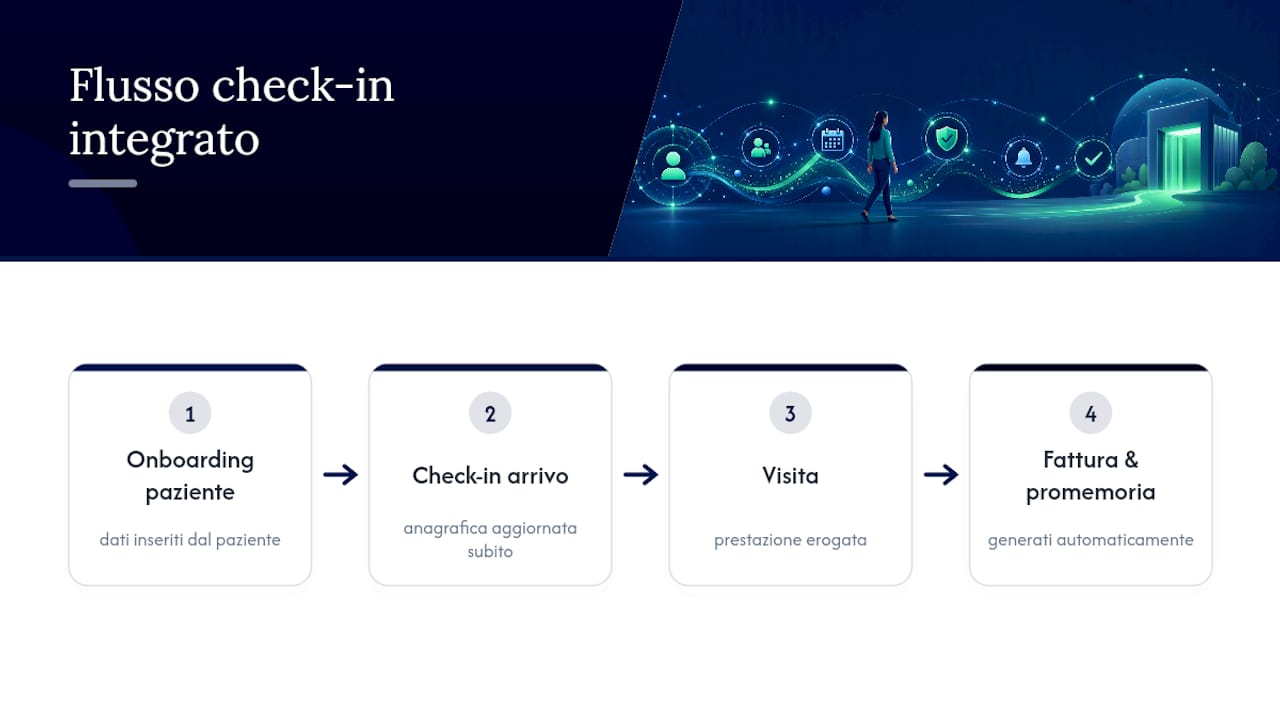
For those who want to see how this translates in practice, Treatbase's operational tutorials cover every phase: patient record management in Part V: Patients, the association between calendar and new patient in Part III: Calendar & New Patient, and payments and collections management in Part VI: Payments.
What really matters in this transition
The temptation, when talking about digital check-in, is to focus on the hardware: which kiosk to buy, which app to choose. It is the most common mistake. The most elegant kiosk in the world is useless if someone in the reception office then has to manually re-transcribe the collected data into the management software.
The real question to ask is not "which device to install" but "where does the data go after check-in". A practice that digitalizes acceptance but leaves the rest of the flow isolated only gets a shifted problem: shorter queues in the waiting room, more data reconciliation work behind the scenes.
The other underestimated point is the digital signature of consents. Many clinics treat it as a bureaucratic detail to be sorted out "later". It is exactly the opposite: without traceable consents, the rest of the digitalization loses legal value when it is truly needed, i.e., in case of a dispute. Anyone implementing digital check-in should start right from there, not from choosing the kiosk.
— Matteo
h2 id="77">Treatbase: the management software that absorbs digital check-in
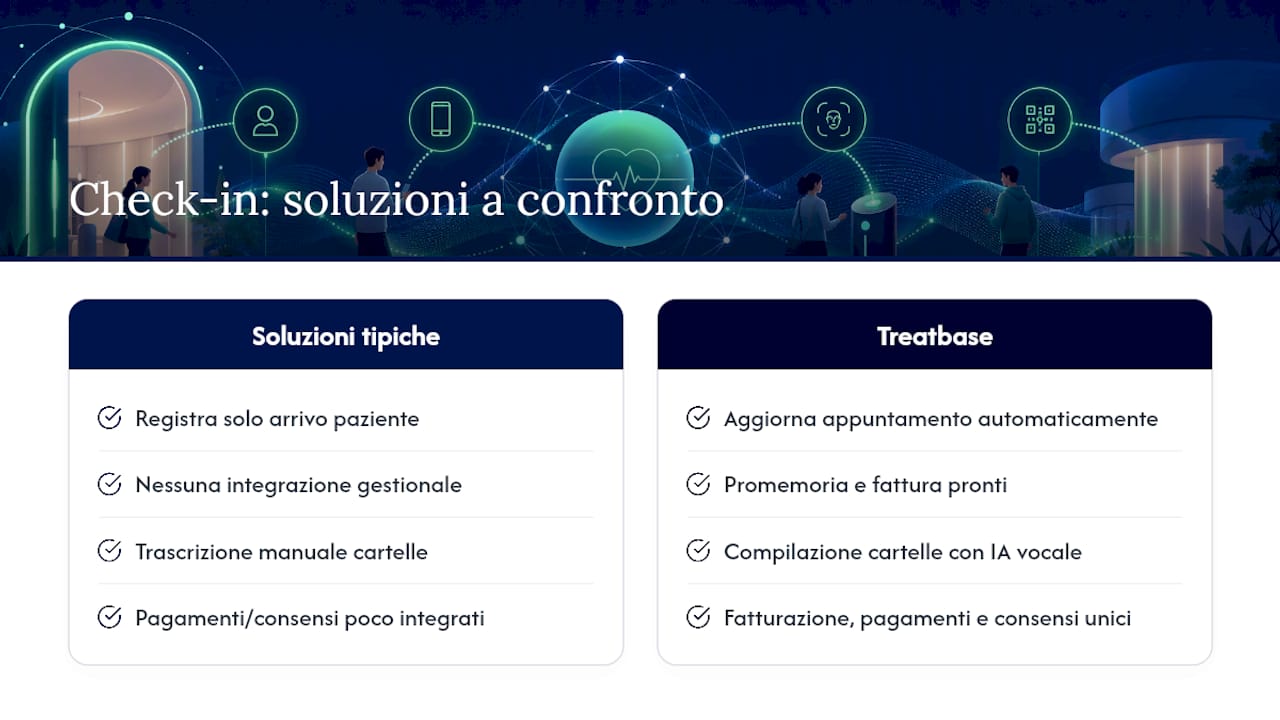
Treatbase is designed for those who want digital check-in to not remain an isolated island disconnected from the rest of the practice. While other solutions limit themselves to registering the patient's arrival, Treatbase receives that data and immediately transforms it into an updated appointment, an automatic reminder, and a ready invoice, without intermediate manual steps.
The system uses voice artificial intelligence to fill in clinical records while the practitioner speaks, eliminates manual transcription, and manages billing, payments, and archiving of signed consents in a single environment. Some practices report saving a lot of time per month in administrative work, time that goes back to the patient relationship. Existing data migration is free and does not require long operational interruptions.
To understand how to set up the practice records before connecting the digital check-in, Part I: Practice Data guides you step by step through the initial activation. Anyone wishing to see the entire system in action can start from the Treatbase main page.
This article provides general information and does not replace the advice of a qualified doctor. Consult a qualified healthcare professional regarding your specific case before acting based on this content.
Sources
Frequently asked questions
How does medical record digitalization work?
The data collected at check-in (demographics, reason for visit, signed consents) directly feed the digital medical record, avoiding double transcriptions. With systems like Treatbase, even the visit itself is documented by voice, without subsequent manual typing.
Who can access a patient's electronic health record?
Every access remains tracked in a log, a central requirement for GDPR compliance.
What is the best software for electronic health records?
There is no single valid answer for every context: it depends on the type of facility, the volume of patients, and the level of integration required with calendar and billing. For dental practices, management software like Treatbase that combines voice records, digital consents, and payments into a single flow reduces the number of parallel systems to manage.
What is an app to manage medical visits?
Apps for managing medical visits allow booking, performing digital patient check-in, and receiving automatic reminders before the appointment. Their effectiveness depends on the degree of integration with the practice management software, not just the user-friendliness of the app itself.
Does digital check-in completely replace the reception desk?
No, not entirely: a human presence remains necessary for patients who prefer or require direct assistance, such as the elderly or people with low digital literacy. Digital check-in reduces the load on the desk, it does not eliminate it.