Voice commands for dental hygienists: what to do and what to know
Discover how dental hygienists can use voice commands to dictate notes, manage reminders, and protect health data in compliance with GDPR.

Voice Commands for Dental Hygienists: What to Do and What to Know
Voice assistants can lighten the administrative workload of hygienists and free up more time for patient counselling. Dictating notes, opening records, and setting reminders by voice can be useful, provided personal and health data are handled correctly and GDPR compliance is maintained. Voice data, when associated with health information, can involve the processing of special category data. There are solutions designed specifically for dental practices, such as Treatbase.
In brief:
Before adopting one, check its integration with your practice management software and test commands on simulated cases: names, tooth numbers, and medications can be easily mistranscribed.
Processing voice data linked to health information requires informed, explicit consent; check with the data controller whether consent separate from treatment consent is needed.
Before implementation, ensure that audio is encrypted, retention is limited, and the provider clearly states where data is stored.
Do not dictate while the patient is expressing a concern: listen to them and respond, then take notes; save dictation for the end of the appointment.
Start using it with just a few procedures and informed patients, train the entire team, and after a few weeks evaluate time saved, satisfaction, and note quality.
Treatbasetreatbase.comRecord clinical notes by voiceTreatbase uses voice AI to simplify everyday work in dental practices and reduce manual transcription.Discover Treatbase
Table of Contents
How voice assistants work in dental hygiene practice
Examples of useful voice commands for hygienists
Privacy and consent: what the regulations require for voice in healthcare
Voice as a clinical tool: how to use it effectively with patients
How to introduce a voice assistant into the practice, according to us
Treatbase: voice AI designed for dental practices
Frequently Asked Questions
Sources
How voice assistants work in dental hygiene practice
A voice assistant is an artificial intelligence program that interprets natural language and performs actions or records information, as described by the Italian Data Protection Authority on its page on digital assistants. For the hygienist, this applies to two main areas.
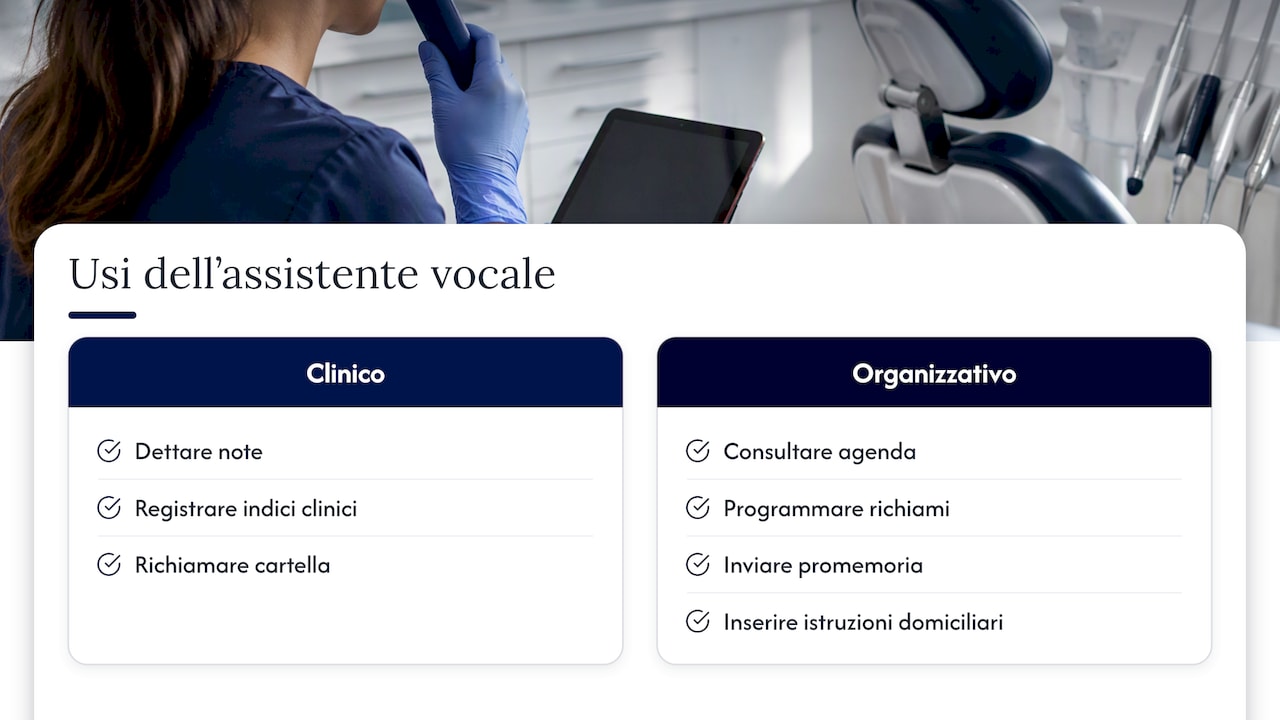
In clinical work, you can dictate notes at the end of the session, record plaque index or bleeding on probing without removing your gloves, and open the patient chart. In administrative work, you can check the schedule, book a recall, trigger a reminder, or insert standard text with home hygiene instructions.
Configuration matters more than technology. A generic assistant might not recognize periodontal terminology or integrate with your practice management software: verify these features before adopting one. Before using it with patients, connect it to the software you already use and test it in a controlled environment: a trial run without patients, with a colleague dictating simulated cases, can help identify terms the system misunderstands and commands that need rephrasing.
Examples of useful voice commands for hygienists
You don't need a huge vocabulary. A few well-crafted phrases cover most of the day. Here are some examples, divided by task type.
Clinical tasks
“Open Marco Rossi's chart” to bring up the patient before the appointment.
“Record medical history: no changes, taking anticoagulants” to update details without typing.
“Clinical note: generalized bleeding, area 3.6 with deep pocket” to take notes during probing.
“Schedule follow-up with periodontal re-evaluation” to set the recall.
Administrative tasks
“Book professional cleaning Thursday at 10” and “Cancel Bianchi's appointment”.
“Send reminders to all tomorrow's patients”.
“Record cash payment” at the end of the visit.
Standard phrases and checklists If you often repeat the same instructions, create a macro: a short phrase that inputs the entire text. “Interdental brush instructions” can bring up the section on size and frequency of use; “First visit checklist” can open the list of points to cover. Macros can prevent having to rewrite the same text every time.
A tip: use short commands starting with a verb (“open”, “record”, “schedule”), speak at a steady pace, and always proofread the note before confirming: voice recognition makes mistakes more easily on proper names, tooth numbers, and medications.
Privacy and consent: what the regulations require for voice in healthcare
When a patient's voice or health information is processed by a voice assistant, the processing involves special category data. According to the Data Protection Authority, this requires informed, explicit, freely given, specific, and unambiguous consent, as well as a setup designed according to the principles of privacy by design and by default.
The Authority indicates that a Data Protection Impact Assessment (DPIA) is often required for health data collected via voice assistants, and that audio should not be stored in the cloud without adequate encryption. Furthermore, the vendor must respect professional confidentiality.
In practice, before adopting a voice tool:
Prepare a specific privacy notice detailing what data is recorded, for what purpose, and for how long.
Check with the practice owner whether, in your specific case, consent separate from treatment consent is needed, and explain the consequences of a possible refusal to the patient.
Evaluate with the practice owner whether a DPIA is required before launch.
Verify that audio is encrypted, retention periods are limited, and the roles of data controller and data processor are defined in writing.
Ensure that the vendor adheres to professional confidentiality and specifies where data resides.
A useful reference for patients, and therefore for explaining what you do to them, is the Data Protection Authority's guide “On the Patient's Side”, which outlines purpose limitations and the need for clear notices. On the clinical front, the Italian National Institute of Health (ISS) highlights that AI in healthcare requires algorithm transparency and careful attention to scientific validation: what the assistant records must be as reliable as a handwritten note.
Voice as a clinical tool: how to use it effectively with patients
Technology frees up time, but that saved time should be invested in the patient relationship. Consuelo Sanavia, in her article on voice as a forgotten skill, argues that the voice serves to motivate, calm, and instruct the patient, and suggests recording and listening back to yourself to improve communication.
Some practical habits:
Prepare standard phrases for explanations you repeat often, but deliver them in your own words, adapted to the person in front of you.
Vary your tone: softer and slower with anxious patients, more energetic when motivating them.
Use deliberate pauses after an important question to allow room for an answer.
Adapt your vocabulary: “bleeding gums” for the patient, “bleeding on probing” in the clinical note.
Record a simulated session and listen back to assess your communication style.
As for choosing between dictating and conversing, dictate notes when the patient is no longer the focus of the conversation—such as at the end of the appointment—and keep direct dialogue active when explaining, reassuring, or listening to concerns. Active listening cannot be delegated.
A tip: never dictate while the patient is speaking about something that concerns them: look them in the eye, respond, and take notes afterward.
How to introduce a voice assistant into the practice, according to us
My advice is to start small. Choose a limited set of procedures, such as hygiene appointments with periodontal re-evaluations, and a small number of informed, consenting patients. Involve the entire team before launch with brief training on privacy and operational workflows, because a consent mistake at reception can undermine clinical efforts. After a few weeks, evaluate three factors: time saved on notes, patient satisfaction, and the quality of documentation compared to before. If the metrics aren't convincing, refine the commands before expanding their use.
— Matteo
Treatbase: voice AI designed for dental practices
With Treatbase, you can use practice management software with voice AI to complete charts by voice, manage schedules and reminders, and automate billing, returning time taken by paperwork back to your patients.
Tools to reduce manual transcription.
Hands-free periodontal charting.
Data migration details available upon request.
Want to learn more about our practice management software? Discover the practice management software and evaluate with your team if it is right for you.
This article provides general information and does not replace the advice of a qualified healthcare professional. Consult a qualified healthcare provider regarding your specific situation before acting on this content.
Frequently Asked Questions
What are the most useful voice commands for a hygienist?
Those that eliminate typing: opening a chart, dictating a clinical note, scheduling a recall, and sending a reminder. Start with four or five short commands and only add more once the initial ones work smoothly without corrections.
Where can I find the available voice commands?
It depends on the system. Generic assistants list them in settings, while practice management software with built-in voice documents them in the user guide. Ask your vendor for the complete list before purchasing and test it with your clinical terminology.
How do I activate voice commands in the practice?
It is typically activated from the software settings, using a wake word or a button. Before using it with patients, however, obtain explicit consent and review the privacy notice and DPIA with the practice owner, as recommended by the Data Protection Authority.
Is voice recording of patients allowed?
Voice data linked to health information can involve the processing of special category data. For health data, processing requires informed, explicit consent; check with the practice owner whether consent separate from treatment consent is needed. It should not be enabled without a clear privacy notice and appropriate security safeguards.