Dental practice schedule management: the chair-by-chair method
Organize your dental practice's schedule by chair: reduce cancellations and workload with three protocols and automated reminders.

Dental clinic agenda management: the chair-by-chair method
Organize the agenda by chair, not by doctor, and apply three operational protocols (slot optimization, drop-out registration, cancellation management) even before choosing a software. The most effective dental clinic agenda management stems from serious annual planning and a management software that automates reminders and check-ins, reducing the reactive work of the reception desk.
In brief:
Organizing the agenda by chair and applying protocols for optimization, drop-out registration, and cancellation management is essential to increase clinic productivity.
Blocking holidays, courses, and closures in advance allows you to structure a realistic annual calendar that is easily adaptable to changes.
Using multi-chair views and buffer slots reduces delays and downtime, improving chair saturation and profitability.
Monitoring indicators such as saturation, drop-outs, and planned production on a weekly basis allows for timely and prophylactic corrective interventions.
A management system that integrates agenda, automatic reminders, billing, and KPI reports simplifies daily management and saves administrative time.
TreatbaseSimplifies agenda managementTreatbase combines automatic reminders, billing, and performance monitoring to ease the daily workload of the dental practice.Discover Treatbase
Table of Contents
Why the agenda is the operational hub of the clinic
Annual planning and layout: organize by chair
The three operational protocols: optimization, drop-outs, cancellations
Roles and processes: who does what in reception and administration
Essential digital features for an effective agenda
Reports and KPIs: what to measure and how to intervene
Operational checklist for the reception desk
How Treatbase supports agenda management
Author's perspective: ideal setup for a 2-4 chair practice
Try Treatbase: free demo and migration in three steps
Sources
Frequently Asked Questions
Why the agenda is the operational hub of the clinic
The agenda is not just a calendar. It is the lever that decides how much the practice produces every day, how much the collaborators earn, and how much time is left to treat patients well instead of chasing gaps and delays. A clinic with a poorly designed agenda loses productivity even with a good flow of incoming patients, because wrong slots, overlaps, and downtime erode hours that can never be recovered.
Those who deal with agenda management in the dental clinic consider the calendar a true annual planning tool, not a list of appointments to be filled day-by-day. This changes three concrete things:
The clinical team works with reliable times between patients, without rushing.
Patients perceive punctuality and organization, elements that influence loyalty to the clinic.
Management can read the agenda as an economic health indicator, not just as a list of times.
A clinic that treats the agenda as a strategic priority stops suffering through the days and starts building them.
Annual planning and layout: organize by chair
The first mistake we see in clinics with chaotic agendas is setting up everything by professional instead of by chair. A dentist can work on different shifts, change days, go on vacation: the chair always remains there, and its saturation is what truly determines the clinic's revenue.
Building a solid annual agenda requires a few steps, but they must be done in order:
Block holidays, courses, and closures first of all, for the entire year, to avoid last-minute reorganizations that the Odontoiatria33 group identifies among the fundamental criteria for correct planning.
Set up multi-chair views in the management system, assigning each chair its own calendar visible separately from the others.
Define roles and permissions: who can edit the agenda, who confirms appointments, who has read-only access.
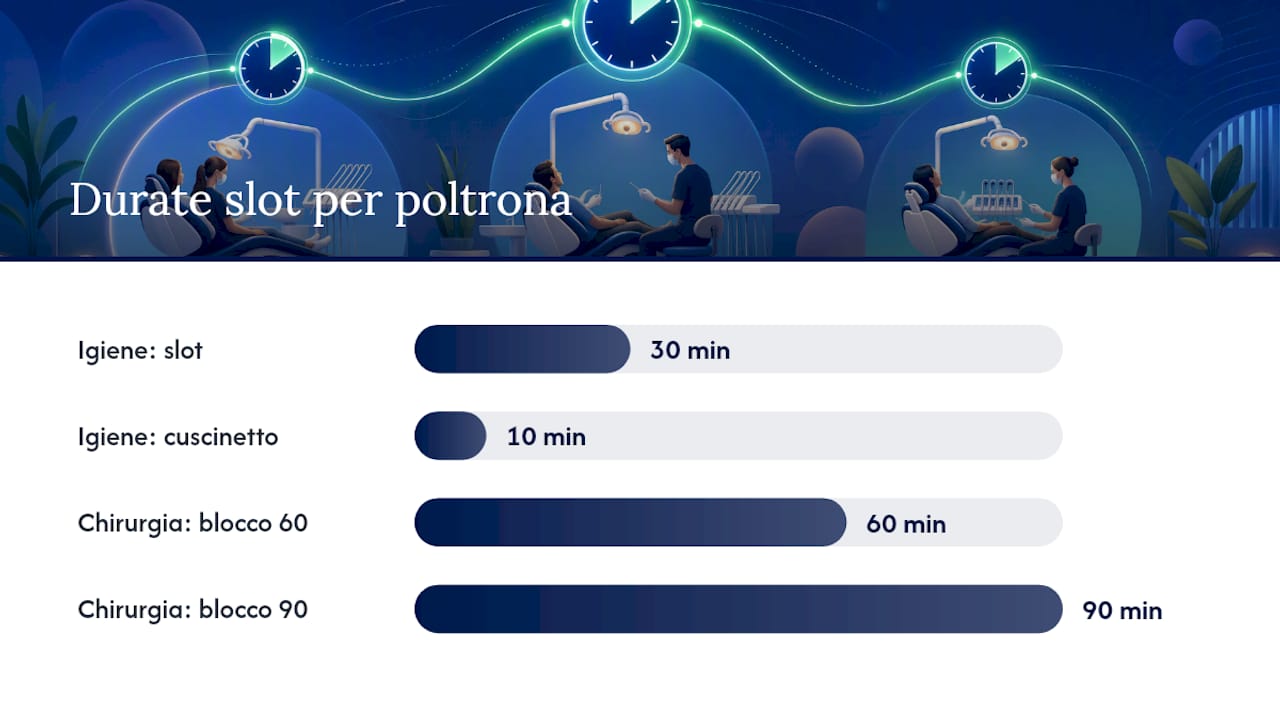
Slot by type of procedure: a hygiene treatment has a different duration than an extraction or an implant session, and treating them as interchangeable blocks generates a chain of delays.
Insert buffer slots between one patient and the next for sanitization and clinical unexpected events, a practice that reduces spillover into the next shift.
A practical example: if chair 1 is dedicated to hygiene and checkups, assign standard 30-minute slots with 10-minute buffers; if chair 2 handles surgery, assign 60 or 90-minute blocks with wider margins. This separation, according to the analysis by dentistamanager.it, makes saturation per chair a readable and comparable indicator over time.
The three operational protocols: optimization, drop-outs, cancellations
A well-designed agenda remains effective only if someone maintains it every day with clear rules. Here are the three protocols that truly make the difference between a clinic that produces and one that chases gaps.
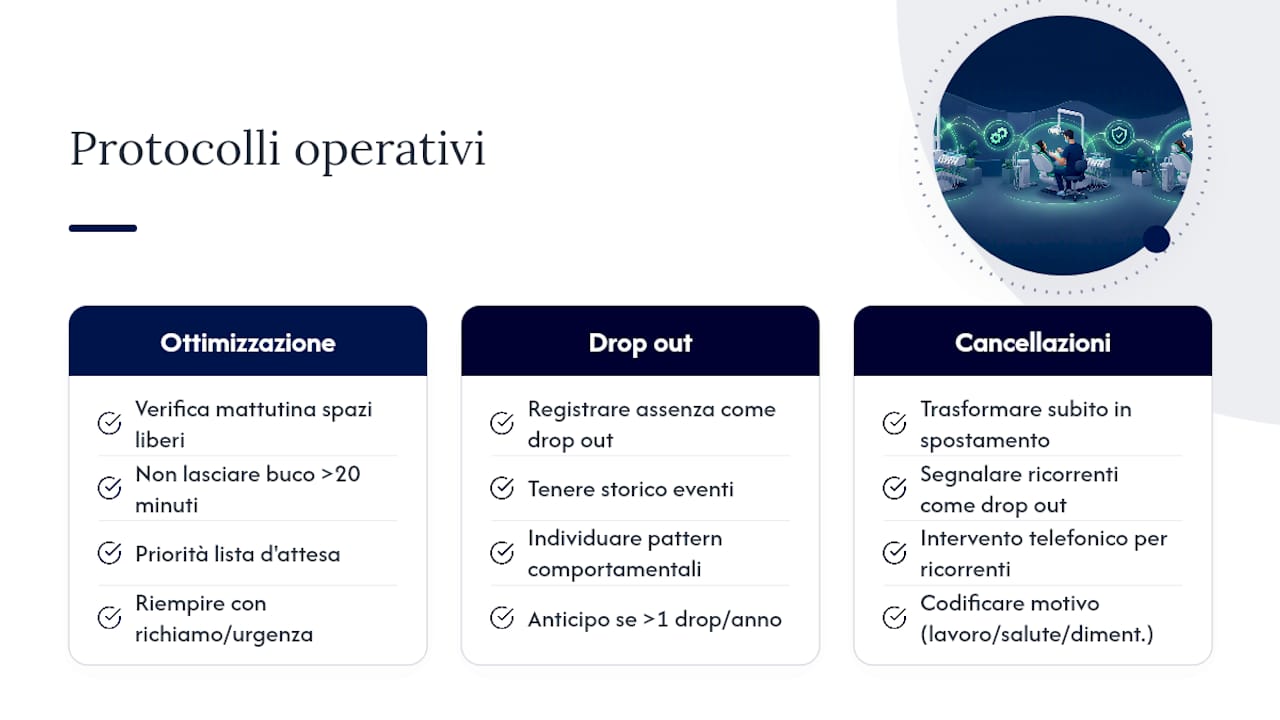
Slot optimization. Every morning, before opening the clinic, the reception staff checks the empty spaces of the day and the following week and tries to fill them with recall appointments or compatible emergencies. The practical rules are simple: never leave a gap longer than 20 minutes without attempting a shift, and give priority to patients already on the waiting list for that type of service.
Drop-out registration. When a patient does not show up without notice, it must be registered as a drop-out and not simply deleted from the agenda. Keeping a history of these events allows you to identify behavioral patterns and apply targeted policies, such as requiring a deposit for patients with more than one drop-out during the year.
Cancellation management. A cancellation communicated with notice must be transformed immediately into a rescheduled appointment, not left as a gap. If the patient cancels several consecutive times, the system should flag them as a recurring drop-out, so the reception desk can intervene with a direct phone call instead of an automatic reminder.
A tip: Assign a coded reason to each cancellation (work, health, forgot) in the management software: after three months you will have enough data to understand if the problem lies in the reminders or in the chosen time slot.
Roles and processes: who does what in reception and administration
Protocols only work if every person knows exactly what to do and when. In most practices with two or more chairs, the distribution of tasks follows this pattern:
Management: sets saturation goals per chair and approves the annual planning of holidays and courses.
DOM (dental office manager): translates management goals into daily rules for the reception desk and checks that protocols are actually applied, not just written on paper.
Front office: manages the full operational flow, from booking to confirmation, from reminder to check-in in the waiting room.
Controller (or whoever performs this function, often the DOM themselves in smaller practices): reads weekly reports and proposes concrete corrections when an indicator falls outside expected values.
The reception flow always follows the same logical sequence: booking, phone or digital confirmation, automatic reminder a few days in advance, and physical check-in upon the patient's arrival. Every skipped step increases the risk of no-shows or delays that propagate throughout the entire day.
Essential digital features for an effective agenda
Not all dental management software truly supports the protocols described so far. Some features are decisive in transforming rules into daily automations:
Chair or room view, with predefined durations and price lists for each type of treatment, so reception doesn't have to calculate in their head how long a session will last.
Multi-channel automatic reminders (WhatsApp, SMS, email), with a scheduled double recall: one a few days away, one closer to the date. This combination significantly reduces no-shows when integrated with a CRM.
Integration with billing and with external systems such as the Health Card System (Sistema TS) for transmitting health data, so the agenda does not remain isolated from the rest of the administrative management.
Color-coding by accounting status, a technique that allows reception to see at a glance if a patient has outstanding payments before even speaking to them.
Those evaluating chat reminder automation solutions can also look at vertical tools like technical guides on booking via WhatsApp, useful for understanding what to expect from a well-made integration. A complete dental management system, according to the overview by Trustdentalmanagement, centralizes the agenda, reminders, and billing in a single environment, preventing data from being scattered across Excel sheets and paper notebooks.
Reports and KPIs: what to measure and how to intervene
An agenda without numbers is just an orderly design. The three indicators that truly matter are saturation per chair (percentage of productive time occupied out of available time), drop-out rate (share of appointments lost without notice), and planned production (economic value of already scheduled appointments, not just completed ones).
The "measure, improve, repeat" cycle described by dentistamanager.it works only if reports are reviewed frequently, not at the end of the quarter. Weekly monitoring allows for quick corrections to saturation or drop-outs, rather than discovering the problem when it has already become an accumulated loss over months.
Common corrective actions include:
Reallocating slots from chairs with lower saturation to higher-demand procedures.
Launching a targeted phone recall campaign for patients with a history of drop-outs.
Reviewing the opening hours of a chair that consistently remains below the expected saturation threshold.
Operational checklist for the reception desk
The reception desk needs written procedures, not daily improvisation. Here is a minimal sequence that works for most practices:
Every morning, check empty slots for the day and the following week, attempting to move patients from the waiting list.
Assign color-coding to the accounting status of each patient in the agenda, so whoever answers the phone immediately knows if a payment reminder is needed.
Follow the standard confirmation procedure: first recall a few days before, second recall the day immediately preceding.
At the end of the week, update the calendar with any changes that occurred and report any under-saturated chairs to management.
This routine, applied consistently, eliminates most last-minute surprises.
How Treatbase supports agenda management
Some software applications implement these protocols directly within the system, facilitating clinical chart entry and allowing staff to focus on confirmations and reminders rather than manual transcriptions.
The operational modules cover exactly the points described so far: agenda view by chair with predefined durations by type of procedure, multi-channel automatic reminders, and a direct link between visit management and billing. Clinics shifting to Treatbase can save over 1,000 hours a month in administrative work, time that translates into more room for patient relations.
Activating a new management system can be done with an initial demo, data migration, and progressive activation of the modules, aiming to minimize operational disruptions.
Author's perspective: ideal setup for a 2-4 chair practice
For a small or medium-sized practice, the order of priority matters more than perfection. First set up the view by chair, then the double automatic recall, and only then refine the reports: starting from KPIs without first reorganizing the layout produces numbers that mean nothing.
The most common mistake I see is treating cancellations as isolated events rather than data to be archived. Those who register every drop-out consistently, even in the first few months when it seems like extra work, will have the most useful diagnostic tool in their hands after a quarter. For a deeper dive into annual scheduling criteria, the Odontoiatria33 guide remains a solid starting point.
— Matteo
Try Treatbase: free demo and migration in three steps
If you currently manage your agenda across Excel sheets, paper notebooks, and a management tool that doesn't integrate billing, the problem is not your organization: it's the tool. An advanced management software can eliminate manual transcription and centralize the agenda, reminders, and payments in a single environment, reducing the double work that consumes time every week.
The process is simple: you book a demo to see the system applied to your specific case, you start the free data migration from your current software with no additional costs or operational interruptions, and you progressively activate the agenda, reminder, and payment management modules based on your clinic's priorities. Those who have already completed the migration report concrete savings on administrative time, time that becomes available for patient care. Request a demo on Treatbase today and evaluate with your team which modules to activate first.
Sources
Frequently Asked Questions
What is the best software for dentists?
There is no single management software that fits every clinic, but indispensable features include view by chair, multi-channel automatic reminders, and billing integration. Treatbase covers these needs with the addition of voice-controlled clinical charts.
How to manage the appointment agenda in a dental clinic?
Organize the agenda by chair instead of by doctor, block holidays and courses one year in advance, and apply the three protocols of optimization, drop-out registration, and cancellation management daily.
What is a good program for managing appointments in a medical practice?
A good program must allow multi-chair views, automatic reminders via WhatsApp or email, and periodic reports on saturation and drop-outs, so management can intervene before numbers worsen.
How often should agenda reports be checked?
A weekly check is the minimum recommended frequency: waiting until the end of the month makes corrections on saturation and drop-outs slower and more costly to recover.