Dental management software data migration: complete and secure guide
Discover how to migrate your dental management software data without stopping your practice: clean export, verified backup, and parallel trial phase.

Dental practice management software data migration: complete and safe guide
Yes, migrating dental practice management software data is feasible without stopping the practice, provided you plan and test it with the correct phases. The elements that decide the result are a clean export, a verified backup, testing in a trial environment, and a period of running in parallel before the final switch. Some providers include data migration and operational support throughout the entire transition.
In brief:
The migration of dental practice management software data can be completed without interrupting clinical activity by studying a plan that includes export, backup, and testing in a trial environment.
The priority data to transfer are patient demographics and invoices, while clinical history and radiographic images are migrated in later phases or gradually.
The overall duration of a well-planned migration ranges from a few weeks to a month, taking into account the size and volume of the clinical history.
It is crucial to appoint an internal point of contact to coordinate all phases and play an active role in preparation and testing before the final switch.
Verifying the transferred data and having a rollback plan are critical to maintaining operational continuity and ensuring data security throughout the process.
TreatbaseSimplifies the transition to the new management softwareTreatbase makes data migration quick and easy, at no extra cost, to help you change management software with greater peace of mind.Discover Treatbase
Table of Contents
Why and when to consider changing management software
Operational checklist before migration
Types of data to migrate and priorities
Project phases and indicative timeline
Testing, verification, and operational continuity
GDPR obligations and contractual responsibilities during migration
Practical perspective on managing change
How Treatbase makes changing management software simpler
Frequently Asked Questions
Sources
Why and when to consider changing management software
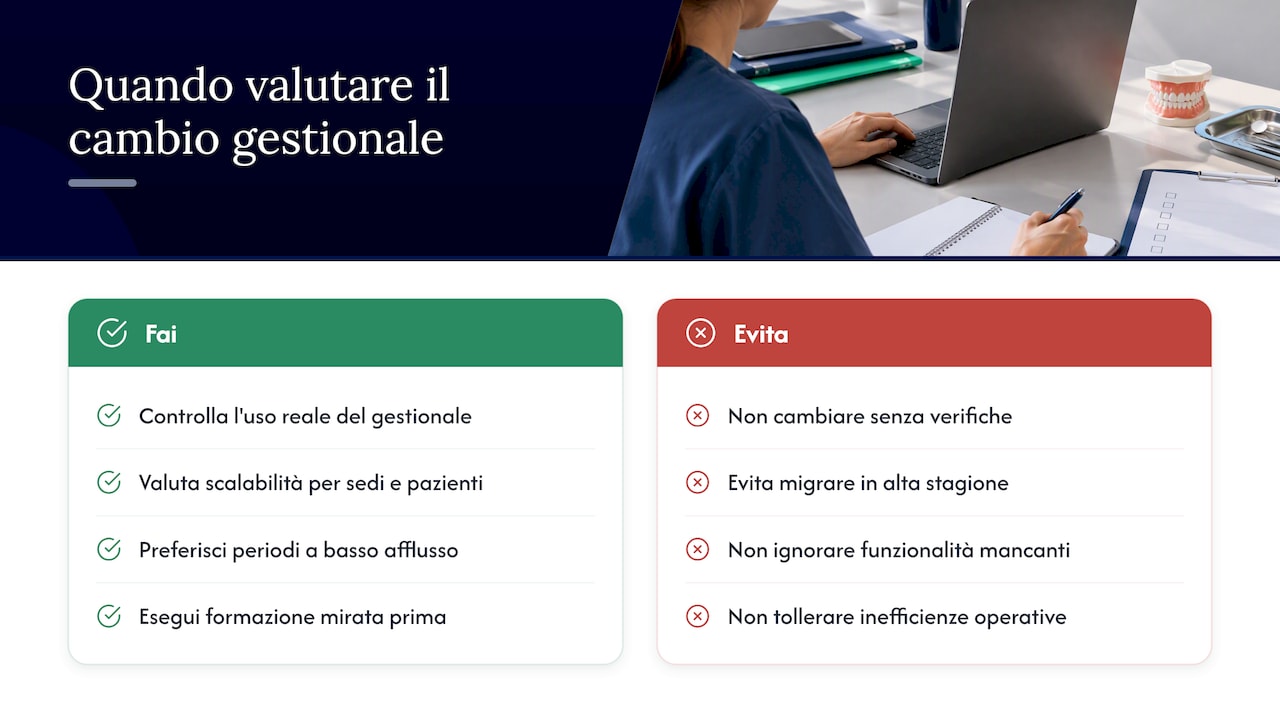
The clearest signal to change management software is scalability: when the current software no longer handles multiple locations, new collaborators, or a growing volume of patients, every daily task becomes slower. Other frequent indicators are missing features (rigid calendar, non-integrated billing, absence of automatic reminders) and operational inefficiencies such as duplicate registrations or synchronization errors between departments.
Before deciding, it is worth checking how much of the existing management software is actually used: often, practices utilize only a portion of the available functions, and targeted training can resolve the issue without a system change.
If migration is nevertheless necessary, periods with lower patient volume, such as August or extended holidays, reduce operational impact and leave more room for testing without compromising clinical activity.
Operational checklist before migration
An orderly preparation reduces almost all the typical risks of a management software migration. Before starting any extraction, the practice should follow these steps:
Export patient records, treatment history, and clinical documents, verifying that each file is readable and complete.
Collect and standardize informed consents and medical history forms, to avoid inconsistent templates in the new system.
Appoint an internal point of contact responsible for the migration, who will follow every phase and act as the liaison with the provider.
Perform a complete backup of the original database, keeping it on a storage medium separate from the one used daily.
Prepare a communication plan for staff and, if necessary, for patients, explaining any temporary changes in response times.
The operational guide by Drilon Hametaj recommends exactly these steps as a starting baseline for a practice changing its management software, along with defining price lists before importation.
Types of data to migrate and priorities
Not all data have the same operational weight, nor do they require the same urgency. The main categories are:
Patient demographics: contact details, tax code, consents, and medical history.
Clinical records: treatment history, treatment plans, and clinical notes.
Radiographic images in DICOM, PNG, or TIFF formats, which are often the heaviest to transfer.
Calendar and appointments, including the configuration of dental chairs and practitioners.
Invoices, bookkeeping, and tax connections to SDI or other transmission systems.
The recommended priority starts with demographics and billing, because these are the data staff use every day to answer the phone or issue a document. The heavier clinical history, including radiographic images, can be migrated in a secondary phase or synchronized gradually, without blocking daily activity. The most common formats remain CSV or XML for demographics and invoices, while images typically travel in DICOM, PNG, or TIFF.
Project phases and indicative timeline
A well-structured migration follows four distinct phases, each with a realistic duration for a medium-sized practice:
Analysis and mapping: identify the data to be transferred and any incompatibilities between the two systems. This generally requires a few days.
Data extraction and cleaning: export demographics, correct duplicates and incomplete fields. Exporting demographics in CSV takes just a few hours, while the clinical history of an average practice typically requires 2-4 weeks.
Importing and configuration in a test environment, where calendar, price lists, and tax connections are verified before touching live production data.
Running in parallel and verification, lasting from one to four weeks, followed by the final go-live once data consistency is confirmed.
To estimate the times for your practice, it is best to start from the number of active patients and the volume of archived radiographic images: the more heavy clinical history there is, the longer the extraction phase will be.
A tip: start the migration with new patients and gradually add active ones, so staff can get used to the new system without having to learn it all at once.
Test, verification, and operational continuity
Before turning off the old system, every piece of transferred data must be verified with precise checks. The most effective procedures include:
Reconciliation between counts and totals: the number of patients, invoices, and appointments must match across both systems.
Sampling of clinical records to compare content and consistency between the old and new management software.
Checking radiographic images, verifying that each file is associated with the correct patient.
Automatic reconciliation reports coupled with manual checks on a sample of cases (deep diff).
Open source tools like dental-bridge prove that it is possible to extract complex datasets in an encrypted and verifiable way, with manifests and integrity checks that reduce the risk of accidental loss or exfiltration of data.
The period of running in parallel, generally from one to four weeks, is the moment when you decide whether to proceed with the final switch. A rollback plan—that is, the ability to temporarily revert to the old system in case of serious discrepancies—must be prepared before starting, not during an emergency.
GDPR obligations and contractual responsibilities during migration
The practice owner remains the primary data controller even when the migration is executed by an external provider. For this reason, before entrusting the operation to third parties, it is advisable to check certain contractual points:
Clear roles between controller and processor (or sub-processor), defined in writing before starting the project.
Security clauses and the right to audit the ways in which the provider manages data during extraction and import.
Concrete technical measures: encryption of data in transit and at rest, logging of operations, and secure backup storage.
The Code of Conduct for management software developers specifies that technical activities such as data migration can cause the provider to assume the role of processor or sub-processor, with all the obligations that derive from it. Furthermore, the Privacy Authority guidelines remind us that health data require enhanced security measures and that the controller retains specific responsibilities even after switching to the new system.
Practical perspective on managing change
The difference between a migration that goes well and one that generates weeks of chaos rarely lies in the chosen software: it lies in the internal point of contact. Without a person to follow every phase and train the rest of the team, even the most intuitive system becomes a daily obstacle.
A useful, often overlooked test is to create dummy patients in the new management software before touching live data: it allows you to understand how the calendar, billing, and archive behave without any risk.
— Matteo
How Treatbase makes changing management software simpler
Some software packages include data migration at no additional cost, with support for configuring calendars, price lists, and billing starting from the very first weeks.
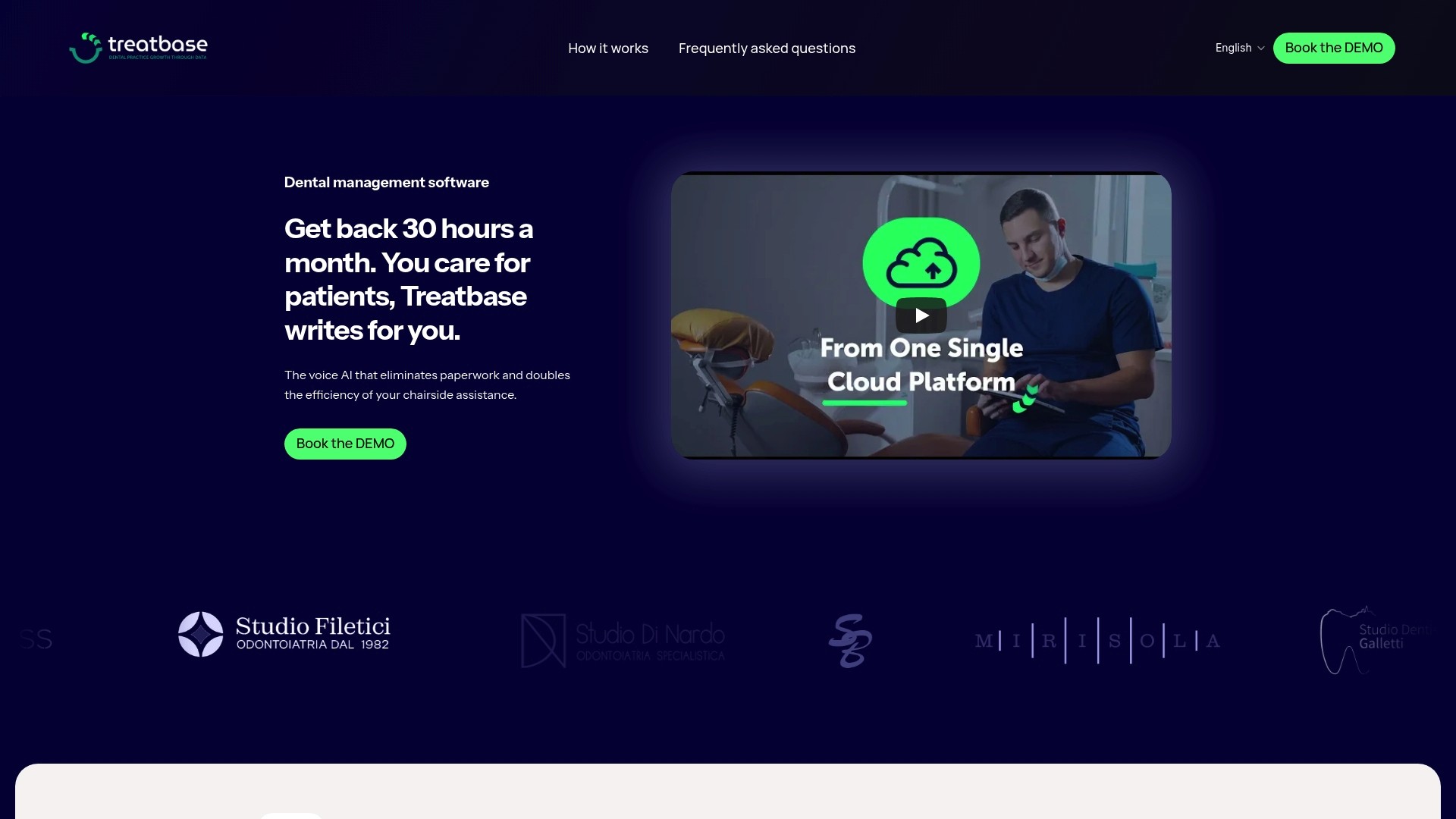
While other providers leave the practice to handle the extraction and import phases alone, Treatbase supports the team with dedicated tutorials on how to organize patient records after the transfer, as well as specific guides for the calendar and new patients and for payment management. This reduces the burden on the internal point of contact during the parallel running period, when more attention than ever is needed. Anyone wishing to evaluate the transition can visit the management software page and check how to set up practice data and backups from the first login.
This article provides general information and does not replace the advice of a qualified attorney. Consult a qualified legal professional regarding your specific case before acting on this content.
Frequently Asked Questions
What is a good management software for dentists?
A good management software for dentists covers calendars, clinical charts, billing, and patient communication in a single system, reducing the need for separate tools. Integrated solutions can include voice-to-text clinical charting and included data migration, which are useful elements for those changing systems without internal technical expertise.
What is a good management software for dental technicians?
Dental technicians generally use software dedicated to laboratory management, separate from the clinical management systems used by dental practices. Since it is not the same type of tool, the choice depends on the tracking features for jobs and orders required by the specific laboratory.
How much does a dental practice owner earn?
The earnings of a dental practice owner vary widely based on location, number of patients, offered specialties, and management costs, and there is no single figure applicable to every case. Factors such as the efficiency of the management software and time saved on administrative tasks nevertheless impact the overall profitability of the practice.
What are the new technologies applied to dentistry?
Among the most common technologies in dental practices are artificial intelligence-based software for voice charting, digital imaging systems, and cloud platforms that centralize scheduling, billing, and patient communication. These tools reduce manual work and allow for smoother management of clinical and administrative data.
How long does a dental practice management software data migration take on average?
Times vary based on data volume and the complexity of the clinical history: exporting demographics to CSV takes just a few hours, while the complete transfer of the clinical history of an average practice typically requires 2-4 weeks. A parallel running period of one to four weeks completes the process before the final switch.